December 3, 2025
 Does your business appear in local search results?
If you’re unsure, you can check right now.
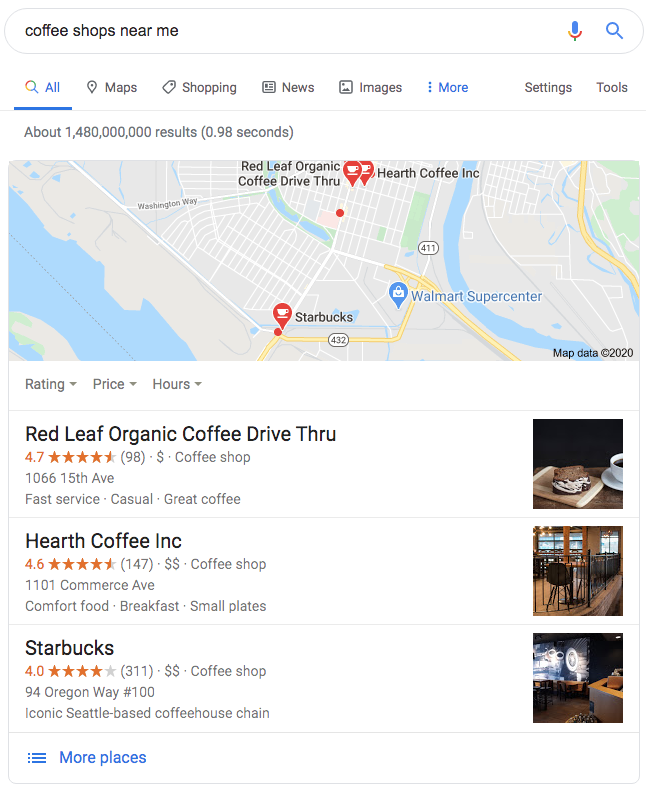
Go to the Google search bar and type in what your business offers (product or service). So, suppose you own a café, you can search “coffee shops near me” and hit enter.
A box will appear displaying a list of coffee-related businesses along with a map.
If your business’s name does not show up on the list of local businesses (check the image below to get a better idea), then you need local SEO.
According to Google, 76% of consumers who search for “near me” visit a business within a day. This means these searchers have a strong intent to visit a physical location quickly. And, you need to leverage this local intent.
Let’s see why local SEO for WordPress is necessary to boost your visibility on Google and other search engines. And check out the top strategies for WordPress Local SEO to attract more traffic to your site.
For a broader approach to WordPress SEO, you can browse through this blog: Ultimate WordPress SEO Guide to Rank Higher on Google.
What is Local SEO?
Local SEO is a subset of SEO. It is the process of optimising a business’s visibility in a way that attracts customers within a specific geographic locality. It involves certain strategies on search engines that enable businesses within a locality to target and cater to the needs of potential customers within the same locality.
Why is local SEO important?
Local SEO is important because it helps nearby customers find your business more easily, improves your visibility in local searches, builds trust, and leads to more visits and sales.
When an online searcher is looking for nearby options, they simply do not keep scrolling the search results page. They only check the list that appears on top of the page.
So, when someone types a location-based query, they expect to see businesses that are nearby and relevant to their needs.
Local SEO strategies are vital for this, as they display your business on SERPs (search engine results pages) to people who are actively searching for the things you offer within your area.
Is Local SEO still relevant?
Yes. Local SEO is and will continue to remain relevant for the foreseeable future. This is because it connects your website with those intent-driven searches. It keeps your business visible in your community in a very practical way.
46 per cent of all Google searches are looking for local information. What does it mean? That tells you people are still searching with a location in mind.
Think about it, you can hardly expect small and medium-sized businesses (SMBs) to have big ad budgets. It is local SEO that helps them compete with other businesses in their domain.
It levels the playing field. These SMBs get connected with online searchers who are on the verge of making a purchase or visiting a brick-and-mortar store.
What’s more, search engines are more sophisticated these days. They use signals such as structured data, genuine reviews, and local citations to determine which businesses to display prominently. Because of this, it is important for businesses to conduct comprehensive local SEO strategies if they expect to be found by online searchers.
6 Key Strategies to Conduct Local SEO for WordPress Sites
What is the best strategy for local SEO?
The best strategies for local SEO include leveraging local keywords, optimizing your NAP, setting up a Google Business Profile, and implementing the LocalBusiness schema.
Many WordPress site owners try a combination of strategies without knowing which ones actually support local visibility. They need to conduct local SEO for WordPress.
The whole point of this guide is to look at the steps that consistently help business owners show up in local results.
Let’s look at the tactics that make it easier for Google to match your WordPress site with local searches.
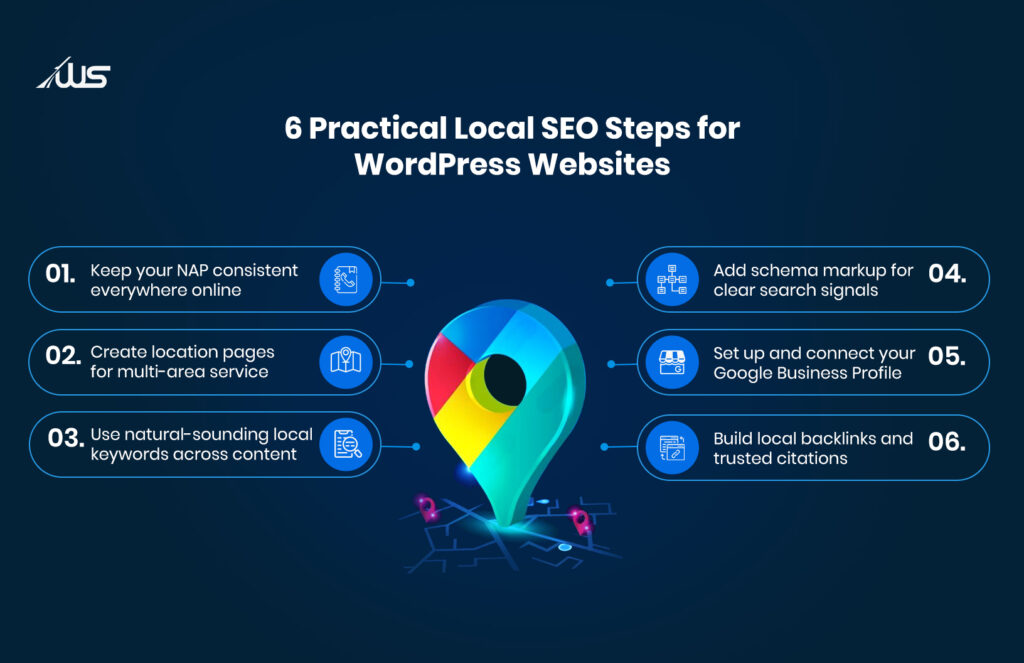
1. Keep your NAP consistent across your site and the wider web
It’s natural for business owners to feel confused when their site appears in some searches but not others.
This usually happens because their NAP, that is, Name, Address, and Phone number, appears differently on various online platforms and listings.
If you are asking, how can I optimise my WordPress site for local SEO? Well, you can start with optimizing your NAP.
Your business’s NAP needs to be identical on your website, footer, contact page, and every listing you appear on. Consistency helps search engines confirm your business identity and show you confidently.
2. Create clear location-focused pages when you serve multiple areas
Imagine someone searching for a service in one part of the city while you operate in several neighbourhoods. They may never find you unless your site explains where you actually serve.
This is why location pages matter.
That being said, these pages should not look cloned. Add your address, locality name, working hours, and simple descriptions of the services you offer in that area. Google does its job by connecting these pages to real local searches with higher accuracy.
3. Use natural local keywords in your content and even in small places
There are many businesses that struggle because they use generic terms that anyone anywhere could use. What they don’t realize is that using local keywords brings you closer to the searcher by placing you within the right geography.
But, what are local keywords for SEO?
Local keywords are simply the phrases that connect your services to your city or neighbourhood. You need to include them within headings, page titles, meta descriptions, and short paragraphs where they genuinely fit. The language should sound like something you would actually say.
4. Add Schema Markup so search engines understand your details
You may have a proper address and phone number on your site, but Google still needs structured details to recognize it correctly.
It may happen that your website is displaying the right information visually, but not in the format Google reads. To fix this, you can implement LocalBusiness schema.
It is a type of code that informs Google about your business category, opening hours, and exact location in a structured format.
No, you don’t have to know coding for this. You can just take the help of popular plugins to add this structure. It will render your business’s details in a format that Google can read and trust.
5. Set up your Google Business Profile and connect it clearly to your site
It’s free of charge to set up your ‘Google Business Profile’ (GBP) listing. But if you’re wondering, how do I optimize my Google My Business profile for better local visibility? It’s simple, really.
Just fill out all details (address, phone, business hours, website) and link to your WordPress site.
Local results depend on GBP details. So, having a well-configured listing will increase your chances of appearing in local-map results.
6. Build local backlinks and citations so Google sees real community links
How do I rank locally on Google? That’s what many WordPress website owners ask when they are not able to attract locals from their neighbourhood.
The worst part is that search engines like Google notice this gap.
This is why it’s important to get listed in your local directories like Yelp, Google Business Profile, Yellow Pages. You can also reach out to sites and media in your community and contribute valuable content and expertise that they can reference.
These citations and backlinks show your business exists within the local environment and is trusted by others around you. Google takes all this as a good sign.
What Are Local Search Ranking Factors?
Maybe you don’t realize it, but search engines have certain local SEO ranking factors that are used to determine which local business’s website is shown at the top of the SERPs.
These ranking factors rely on accuracy, updates, and genuine local signals. So, before you try anything else, it helps to understand what can actually help your business rank higher.
-
Google Business Profile accuracy
Google looks closely at how complete and correct your profile is. If your business hours, categories, phone number, and website link stay updated, Google treats your listing as dependable. Obviously, your site will lose trust if it has outdated information. Being thorough with your GBP gives searchers the details they expect when they look at a listing.
-
NAP consistency
Small differences in your Name, Address, and Phone number across directories and listings create confusion.
You should be aware that search engines compare your details across the web, so any mismatches can reduce your visibility.
If you want Google to see your business as stable and legitimate, NAP consistency is vital.
This has the added benefit of gaining the trust of online searchers when they find accurate business information to contact you.
-
Customer reviews and ratings
Reviews and ratings show real experiences and offer a strong signal to Google about your reliability.
Frequent, authentic reviews give search engines an idea of how your business is viewed by customers.
Other than search engines, positive reviews also influence people. It’s normal for people to choose listings that look active and trustworthy. For this, you can encourage your satisfied customers to leave honest feedback on your listings or other directories.
-
Searcher proximity
Even how close a searcher is to your location impacts how Google ranks you on SERPs.
This means a business that is physically nearer often appears first.
You cannot control someone’s distance, but you can make sure your address is accurate and recognisable.
This helps Google place you on the map correctly when a local search happens around you.
-
Match business information to user queries
Search engines compare the wording of a person’s search query with the business information you provide.
So, make sure that your business category, descriptions of your services, and other informational content match what people search for. Your business is more likely to appear prominently if that’s done.
If you provide broad or generic descriptions about your business, Google will find it hard to gauge your relevance. Clear wording helps the system recognise what you offer and where you offer it.
What are the best local SEO plugins for WordPress?
Some of the best local SEO plugins for WordPress include Yoast SEO, Rank Math, AIOSEO, and WP Go Maps (formerly WP Google Maps).
To conduct local SEO for WordPress you need the right tools. Fortunately, there are top-rated plugins that you can use to enable search engines to read your business information clearly.
If you want to improve your local rankings, the following are some of the plugins that will make things easier.
-
Rank Math
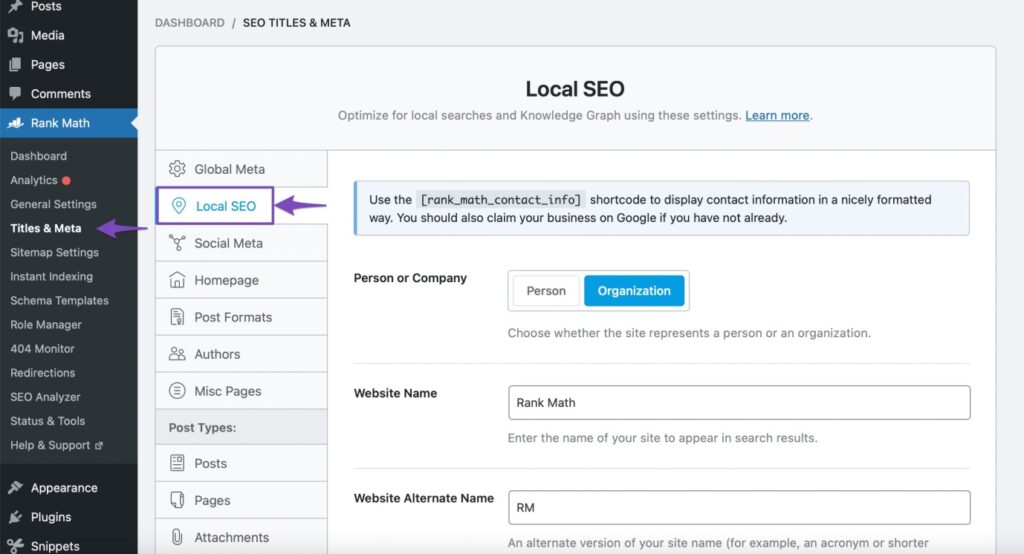
With the Rank Math plugin, WordPress site owners get a structured way to optimise local details.
The features of this plugin offer you a simple way to add LocalBusiness schema and accurate business information. You can easily update metadata through this tool.
All your website’s important pages can be indexed accurately through proper sitemap management.
The intuitive interface and automation features of Rank Math help to boost your site’s local search visibility.
-
All in One SEO (AIOSEO)
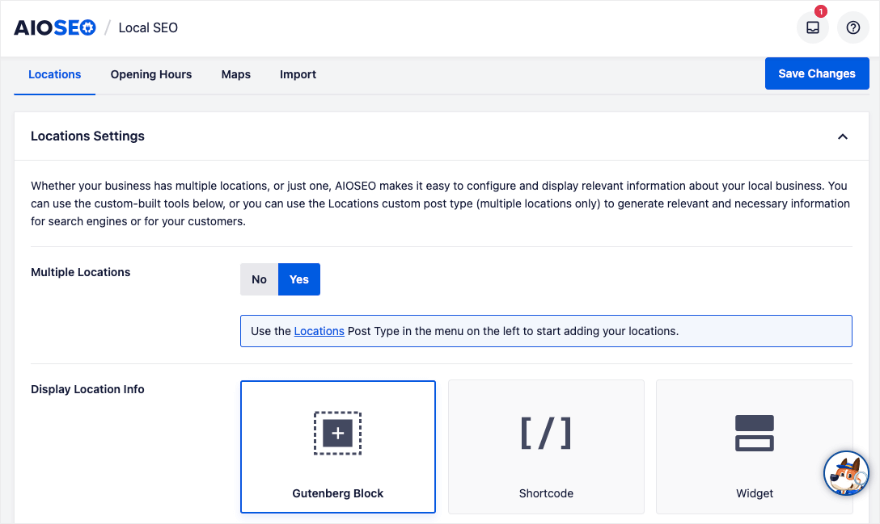
If you run a small business, AIOSEO is one of the top plugins to optimize local SEO tasks.
It has a local SEO module that lets you manage all business details with ease. You can include details such as business hours, maps, the area served, and proper schema markup.
Plus, you get to set up your Google Maps API key and location blocks directly within your pages.
The plugin gives search engines clearer signals about who you are and where you operate.
-
Yoast SEO
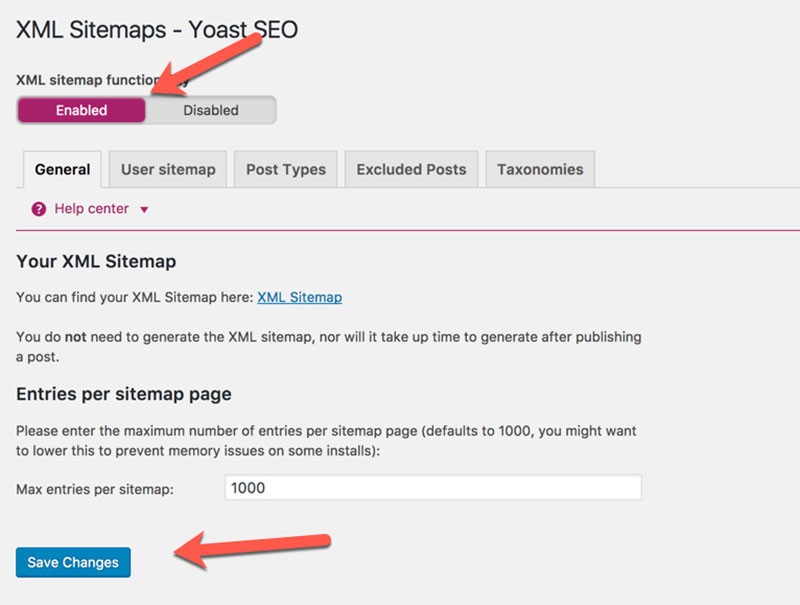
While Yoast SEO is being used by site owners for general optimisation, it is especially important for Local SEO.
It helps you to easily create an XML sitemap, which allows Google to understand your pages and crawl them.
The plugin can strengthen your business’s local signals by allowing you to add NAP details, opening hours, and structured data that matches Google’s requirements.
-
WP Google Maps

On WP Go Maps (formerly WP Google Maps) you can optimize your site’s local SEO by displaying your business’s accurate location. This WordPress plugin offers simple settings that ease things for business owners.
You can add custom markers, store locator features, and responsive maps that help customers find you quickly.
When search engines see a clear, verified location associated with your pages, they better understand your service area. It is useful for businesses with physical locations.
Final Thoughts
Most local searches come from people who want quick clarity. No one wants long explanations.
That is why businesses that organise their details and maintain steady updates usually attract more local attention.
A well-built WordPress site supported by precise local signals can hold its place in competitive markets without constant adjustments. It grows more visible as real customers interact with it online and offline.
So, do you want to know more about implementing local SEO for WordPress? The expert digital marketers at Webskitters Technology Solutions can assist you.
Our SEO professionals will refine your local structure and strengthen your online presence. We will make sure your business appears precisely where customers are actually searching.
Get in touch with our expert consultant to boost your WordPress website’s local visibility.
Frequently Asked Questions
1. What are local keywords I should use for WordPress SEO?
You need to use keywords that mention your service and location together so Google understands where you operate. These terms help match your website with nearby customers searching intentionally.
2. How can I make my WordPress website more visible locally?
Add accurate business information, optimise pages with local keywords, set up your Google Business Profile, and use plugins that support location data. These steps strengthen your local presence.
3. Why do reviews help my WordPress site rank better locally?
Reviews show real customer experiences, which helps search engines trust your business more. Positive and frequent reviews encourage higher visibility and bring more visitors to your listing.
4. How is SEO different from local SEO on WordPress?
SEO focuses on general visibility across broad searches. Local SEO focuses on nearby customers who need specific services within their area. Both matter, but local SEO targets location-based intent.

 UI/UX Design
  Web Development
  Mobile App Development
  Internet Of Things
  Game Development
  Artificial Intelligence
  Digital Marketing
  Data Science Consulting