 February 27, 2026
 Now that you have done the hard part of building your WooCommerce website, it would be a pity if it does not rank well, right? Thankfully, WooCommerce SEO can boost your store’s ranking on SERPs (search engine results pages) and significantly increase traffic to your online store.
If you don’t know where to start, this article will walk you through what WooCommerce SEO is and the top ecommerce SEO strategies that professionals use to boost store rankings.
What is WooCommerce SEO?
WooCommerce SEO is the most reliable way of optimizing your online store’s product pages, category structure, technical setup, and authority signals, in order to rank higher for relevant search queries.
In practical terms, it’s a mix of both traditional SEO principles and certain e-commerce-specific optimisation strategies. Blog content is only a part of it. Apart from that, WooCommerce SEO prioritises product visibility, transactional keywords, structured data, and conversion-friendly pages.
The main aim of WooCommerce SEO is:
-
Organic traffic
-
Higher rankings
-
Sales growth
Let’s look at how regular SEO differs from WooCommerce SEO.
WooCommerce SEO vs General SEO
|
Area |
General SEO |
WooCommerce SEO |
|
Primary Pages |
Blog posts, service pages |
Product & category pages |
|
Search Intent |
Informational & commercial |
Mostly transactional |
|
Schema Focus |
Article, FAQ |
Product, Review, Breadcrumb |
|
Key Metric |
Traffic growth |
Traffic + revenue |
Top Strategies to Rank Higher with WooCommerce SEO
If you’ve noticed that your store is not ranking on Google or other search engines, it is rarely caused by one issue.
The SEO problems of your store arise from minor weaknesses across content, technical setup, and authority building. Because WooCommerce runs on WordPress, you have full control over fixing these areas.
You would need to optimize each key area of your WooCommerce website, including:
- On-Page SEO
- Technical SEO
- Off-Page SEO
- Local SEO
1. On-Page SEO for WooCommerce
This area is primarily concerned with everything that exists directly on your website. Your product titles, descriptions, internal links, and page structure are included in this.
This is what Google’s Search documentation says:
“To give you the most useful information, Search algorithms look at many factors and signals, including the words of your query, relevance and usability of pages, expertise of sources, and your location and settings.”
So, to begin with, you need to strengthen your on-page SEO strategy.
Keyword Research
Before you even start optimising your store, you would need to understand what it is that people are searching for. Tools such as Google Keyword Planner, Ahrefs, or SEMrush can help you figure out search volume and variations of keywords.
While you are researching keywords, focus on:
-
Buyer-intent phrases such as “buy leather wallet online”
-
Long-tail keywords with clear purchase intent
-
Category-level searches like “men’s trail running shoes”
-
Product-specific queries, including model numbers
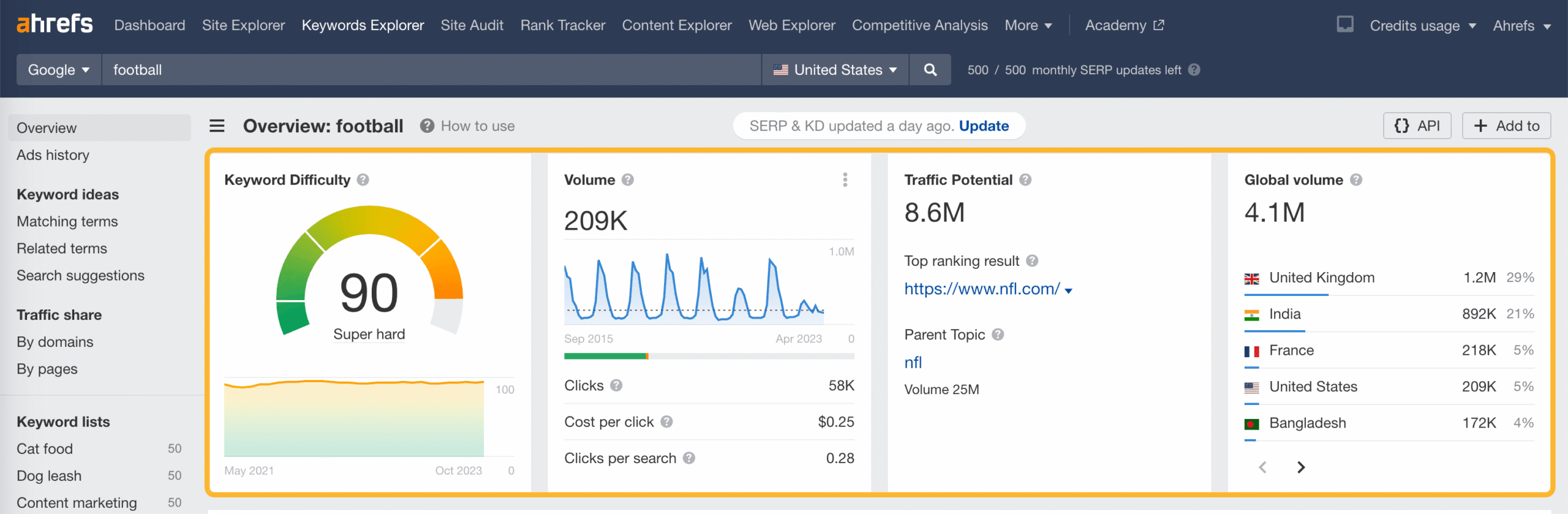
As you can see, on Ahrefs, you can get a visual representation of measurable keyword data. It’s important to analyse actual search data to guide your product titles and descriptions.
Optimizing Product Pages
What has proven to work well is when every product page of your store functions as a landing page. It focuses the attention of the potential buyer, offering a distraction-free sales pitch designed to drive a single action.
If you use scanty descriptions and copied manufacturer content, you can expect your rankings to weaken.
Why? This is because Google’s helpful content guidance stresses originality and usefulness.
Look at the product pages of the top ecommerce stores, and you will find detailed descriptions, specifications, internal links, FAQs, and customer reviews. And, of course, be sure to incorporate targeted keywords where they fit.
Weak vs Strong Product Page
|
Weak Page |
Strong Page |
|
Short generic description |
100–300+ words of unique content |
|
No FAQs |
Answers common buyer questions |
|
No related products |
Internal links to similar items |
|
Copied manufacturer text |
Original benefit-focused content |
Meta Titles & Descriptions
Your store’s meta titles should include the primary keyword and clearly describe the product or service on offer.
Other than keeping your meta titles precise (within 50-60 characters), you would be wise to avoid stuffing multiple keywords. Google no longer tolerates stuffing. The meta descriptions you write need to give potential customers a quick summary of the service or product and encourage them to click.
Although meta descriptions are not a direct ranking factor, they do influence click-through rate. This is important because a higher click-through rate can improve the overall performance signals of your WooCommerce store.
Content Marketing
Other than product pages, content marketing is also a great way to strengthen your WooCommerce store’s topical authority.
How would that help?
Search engines currently favor websites that demonstrate in-depth knowledge (E-E-A-T, which stands for Experience, Expertise, Authoritativeness, and Trustworthiness), considering you a trusted expert in your specific niche.
Many stores create buying guides, comparison articles, and how-to posts in an effort to attract visitors earlier in the buying journey.
You will be able to rank for informational keywords while at the same time maintaining internal links to your products.
The stronger your topical authority, the better the chances of your being found higher on SERPs and even on AI search results.
Now we’ll have a look at how you can fix your technical SEO to rank higher on search results.
2. Technical SEO for WooCommerce
Even well-written content will not rank well if search engines struggle to crawl your store. This is the job of technical SEO.
It ensures that Google can access, understand, and index your pages correctly.
Setting up SEO-Friendly URLs
The structure of your store’s URLs should be helpful to both users and search engines. The default structures tend to be filled with numbers and/or unnecessary parameters.
Rather than that, use descriptive slugs that showcase the page’s product or category name.
For example:
yourstore.com/mens-running-shoes
Avoid:
yourstore.com/product?id=12345
WordPress allows you to customise permalinks. You can make your URLs more descriptive and SEO friendly with this feature.
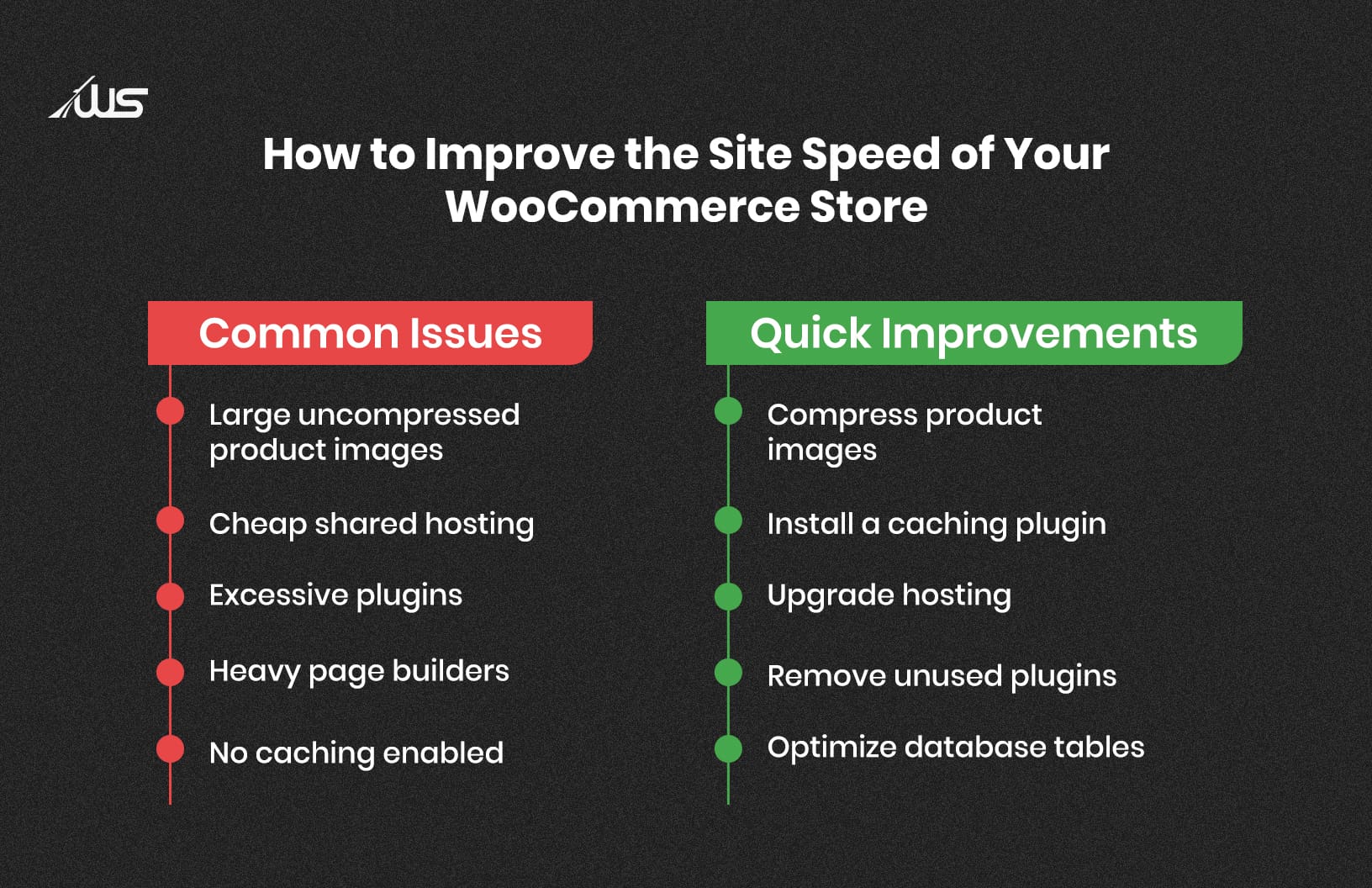
Optimizing Site Speed
According to Google Ad Sense research, 53% of mobile users abandon a site if it takes longer than 3 seconds to load.
Yes, site speed directly affects the user experience and ranking of your WooCommerce store.
Plus, Google’s Core Web Vitals (user-centric metrics from Google that evaluate a web page’s performance) measure loading performance and visual stability.
After gauging how users perceive the experience of interacting with your store’s web page, they will either rank you higher or lower on search results.
Making Mobile-Ready Stores
As of late 2023, Google uses mobile-first indexing. So, accordingly, it evaluates your mobile version first. This means that the WooCommerce theme you use needs to be highly responsive, readable, and easy to navigate.
-
Buttons should be clickable without zooming.
-
Checkout must function smoothly on smaller screens.
-
Store layout needs to adjust automatically.
-
Pages should load under 2.5 seconds.
A good way to check your site’s mobile readiness is by using Google Search Console’s Mobile Usability Report and PageSpeed Insights.
Use Structured Data & Schema Markup
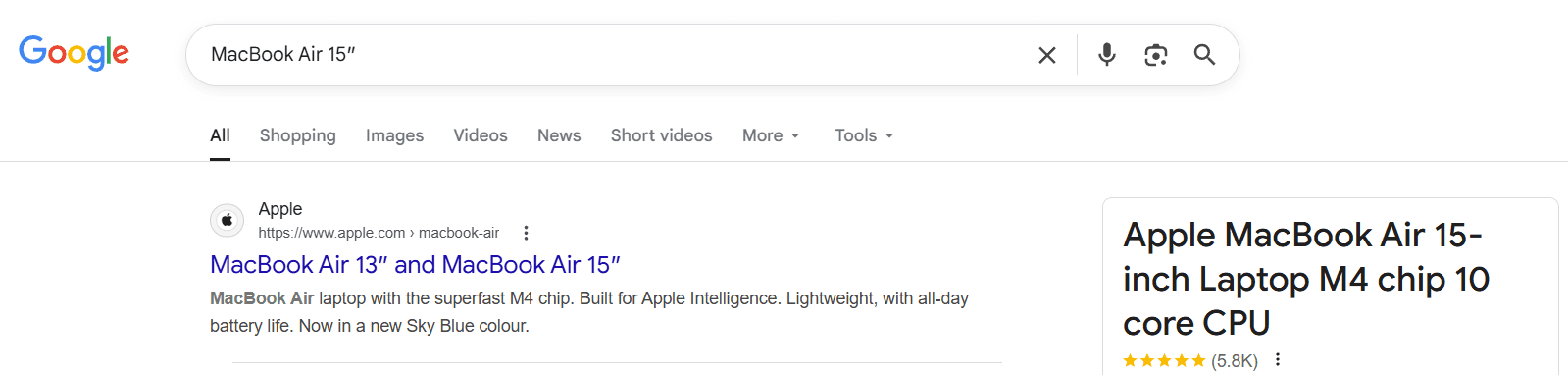
According to Moz, websites with structured data are more likely to get pulled by search engines in the form of rich snippets.
The image below shows compact snippets (containing details like star ratings, images, and prices), which get much higher clicks from search results, as opposed to sites with unstructured data.
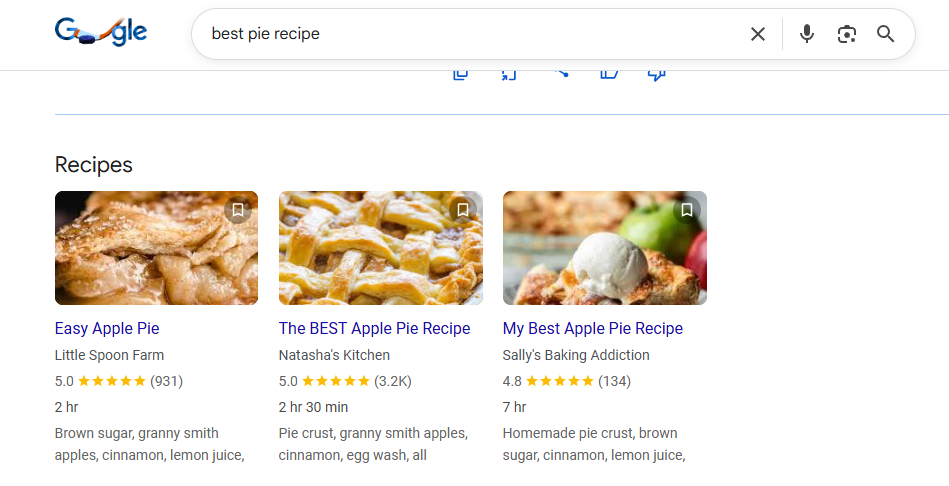
Structured data is what helps Google understand your product details. The WooCommerce platform is designed in a way that it supports product schema that displays price, availability, and reviews directly in search results.
Common WooCommerce Schema Types
|
Schema Type |
What It Shows in Google |
|
Product |
Price and stock status |
|
Review |
Star ratings |
|
Breadcrumb |
Category path |
|
FAQ |
Expandable questions |
3. Off-Page SEO for WooCommerce
Search engines evaluate a website’s authority signals beyond the content on the website. Backlinks remain one of the strongest ranking factors according to industry research.
Last year, Backlinko evaluated 11.8 million Google search results and found that the number 1 result in Google has an average of 3.8x more backlinks than the rest of the results.
But, you need to ensure that the backlinks you get are of high quality and relevant, rather than trying to purchase a high number of links.
Link building involves:
Influencer Collaborations
Working with influencers in your industry can help you gain you the kind of visibility and backlinks you need to help you build your brand.
Your business can collaborate with influencers (whether it’s asking them to write about or mention your products) as it helps you get referral traffic and build link authority. But be sure to select influencers whose audience aligns with your target audience.
Guest Posts
Google forbids the purchase of backlinks (especially from cheap link farms). But when you produce original research, comprehensive guides, and compelling visuals, you make content that’s link-worthy. It is this type of informative content yet non-promotional content that will get you contextual backlinks from authoritative sites, which can steadily improve your domain authority.
Broken Link Building
This link-building technique involves finding a broken link on a relevant site and offering your content as a substitute. You can use Ahrefs to find broken outbound links. When you offer a valuable substitute, the site owners will replace the link.
4. Local SEO for WooCommerce
You might assume local SEO does not apply because you do not have a physical storefront. However, location-specific searches, including “near me,” account for a significant portion of Google queries. Even online stores benefit from regional visibility.
While it may seem unnecessary to conduct local SEO for your WooCommerce store, it’s not. Your logic: My business does not have a physical storefront, so why would I target local customers?
Well, according to HubSpot, location-specific searches (“near me”) make up nearly half of all Google searches.
You would be building visibility and trust among specific communities.
Local SEO helps you:
-
Appear in geographically targeted searches
-
Build trust within specific communities
-
Increase visibility in Google Maps results
-
Compete in city-based search terms
Google Business Profile (GBP)
You can increase your online store’s visibility in local search results (because you wouldn’t want to miss out on the huge number of people that are searching there) by creating and optimising a Google Business Profile.
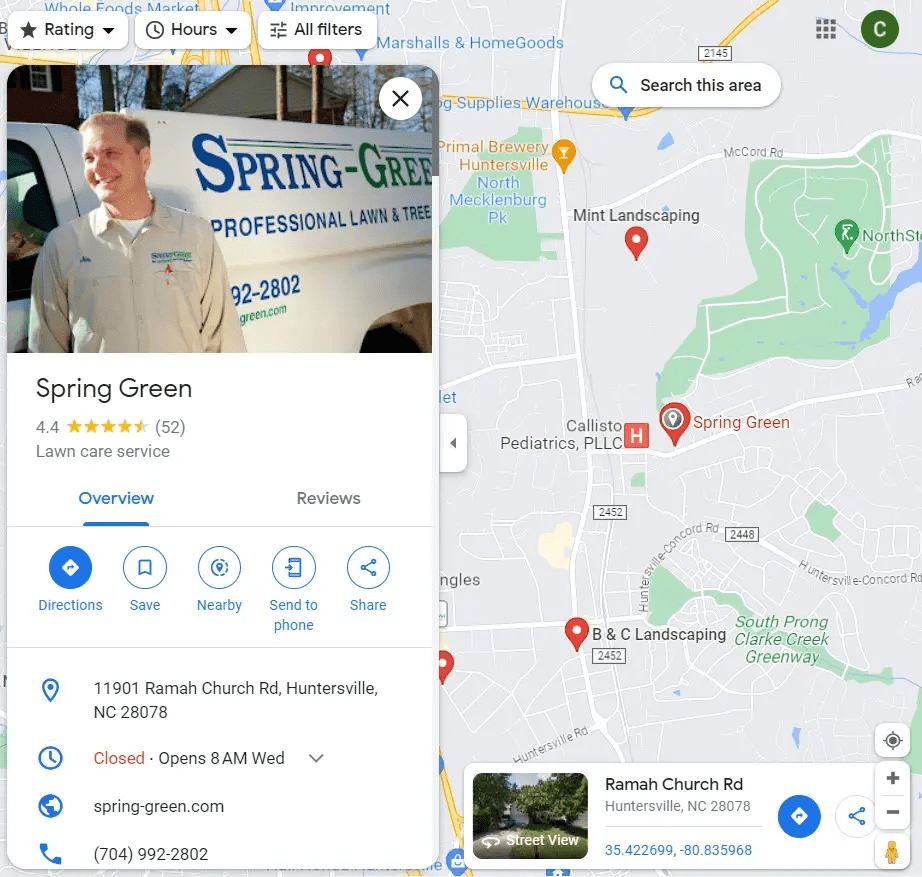
You can list service areas even without a storefront (as shown in the image above) by registering as a ‘Service Area Business’ (SAB). Ensure that your information is accurate and regularly updated.
Local Landing Pages
If you serve specific regions, create dedicated landing pages, even if you do not have a brick-and-mortar store.
Each page of your store should include unique, location-relevant content.
Of course, do not just create duplicate content with only city names changed. That said, local landing pages are a great way to earn organic search engine rankings.
Local Schema Markup
For your service area businesses (i.e., your online store), use local schema markup code to inform Google or other search engines about your operating area, services, and contact details.
This works in your favor, even when you do not have a physical customer-facing address.
Local Reviews
Other than reviews on your website itself, encourage customers to leave reviews on Google and relevant platforms.
It has been found that reviews have a strong impact on local rankings, and they certainly help build the credibility of your WooCommerce website.
Tracking WooCommerce SEO Performance
If you expect to climb up in search results, your SEO improvements must be measured consistently. With the relevant data, you can check what works and what needs adjustment.
Key SEO Performance Tools
|
Tool |
What You Learn |
|
Google Search Console |
Keywords, impressions, and indexing issues |
|
Google Analytics |
Organic traffic and conversions |
|
Nightwatch |
Keyword position changes |
Google Search Console (GSC)
With the help of the performance report on GSC, you can monitor queries, clicks, and average positions. You need to check for pages with high impressions but low clicks.
Google Analytics
You can easily track your store’s organic traffic trends and product conversion rates using Google Analytics. Figure out which landing pages generate revenue.
Rank Tracking Tools
Your primary keywords can be monitored on popular tools like Nightwatch, Ahrefs, or SEMrush. Tracking the ranking movement is a proven way to measure the impact of your optimisation efforts.
Wrapping Up
There’s no denying one fact. If your WooCommerce store is not ranking, of course, it will affect your visibility and sales.
Despite having good products and a fully functional website, your store could remain invisible to potential customers.
Do you need WooCommerce SEO to rank higher on Google and AI search? The experienced SEO professionals at Webskitters can ensure your online store enjoys consistent visibility and predictable organic traffic,
Our expertise includes technical optimisation, structured data setup, content refinement, and authority building. Connect with our experts to explore a structured SEO plan tailored specifically to your WooCommerce store.
Frequently Asked Questions
1. What is WooCommerce SEO?
WooCommerce SEO means improving your store so Google understands and ranks it higher on SERPs. You work on product content, structure, and relevance so more buyers find you online.
2. How do I optimise product pages in WooCommerce?
You can make your product titles clear, add unique keyword-rich descriptions, and include high-quality images. Also, put relevant FAQs so search engines and shoppers both understand each product.
3. How to do SEO for WooCommerce?
-
Start with keyword research to find buyer search terms.
-
Optimize product titles and descriptions with those keywords.
-
Improve site speed and mobile usability.
-
Add schema markup. Build quality backlinks.
-
Track performance using Google Search Console and Analytics regularly.
4. Why is site speed important for my WooCommerce store?
Fast-loading sites keep visitors from leaving. Google also uses speed as a ranking factor, so slower sites usually rank worse compared to faster ones.
5. Should I use schema markup on WooCommerce?
Yes. Schema helps Google understand your products, prices, reviews, and FAQs, increasing the chances of rich results that can bring in more clicks.

 UI/UX Design
  Web Development
  Mobile App Development
  Internet Of Things
  Game Development
  Artificial Intelligence
  Digital Marketing
  Data Science Consulting