 March 25, 2026
 Are websites still relevant in 2026?
If you expect a successful online presence, having a well-designed website is imperative. Even AI search results extract their information from structured, reliable web content.
You may be planning on hiring a professional to build a website, but are doubtful whether they are worth the effort.
The truth is, a generic, un-optimized website is pretty useless because it fails to achieve the primary goals of a business-
-
Being found
-
Being trusted
-
Converting visitors into customers
Why hire a web developer?
If the website you plan to develop involves complex functionality, high customization, or high-security needs, it is not possible to manage without the expertise of professional web developers.
Hostinger reports that if a website takes more than three seconds to load, 53% of mobile users exit.
So, it’s vital that the website you develop is fast-loading, secure, and effortlessly responsive on mobile devices. Experienced web developers have the expertise to make this happen.
Of course, you have the option of using website builders, but this is mostly a low-cost solution for beginners or simple sites. These platforms may not be able to help you when you need advanced functionality.
Can ChatGPT actually create a website?
While ChatGPT can assist you during website development, it cannot actually develop a website all by itself.
People are using the AI platform to brainstorm website ideas and create a structure for their websites.
It is mostly used during the planning stage to give you a clear picture before design begins.
Before we get into the reasons for hiring a web developer to build your website, let’s first get an idea of what is involved in web development.
What is Web Development?
During the process of web development, web developers will write the code that your website is going to be built on.
Included in this is front-end development (what your visitors see) and back-end development (what your internal team sees).
Web developers also maintain and update the websites and web apps (an app that can be accessed via a web browser) that they build.
Now, the question is, do you take the DIY route (website builders like Wix, Shopify, or Squarespace) or opt for custom web development? The following might help you decide.
DIY vs Custom Web Development
| DIY Website Builders | Custom Web Development | |
|---|---|---|
| Cost | Low starting cost with monthly fees | Higher upfront cost, built for long-term use |
| Setup | You handle everything yourself | A developer plans and builds it for you |
| Design | Limited to templates and presets | Designed around your business needs |
| Flexibility | Hard to change beyond basic options | Can be adjusted as your needs change |
| Speed | Can slow down with heavy templates | Built to load faster and run smoother |
| SEO Setup | Basic tools, limited control | Proper structure for better visibility |
| Scalability | Difficult to expand later | Built to grow with your business |
| Maintenance | You fix issues yourself | Ongoing support available if needed |
| End Result | Works, but often feels basic | Built to support traffic, leads, and sales |
Why Hire a Professional to Build a Website
If I hire a web developer, will my website bring in traffic, leads, and paying customers?
That is a good question.
It’s pointless to have a website that just occupies space on the internet. So let’s see what a professional can bring to the table.
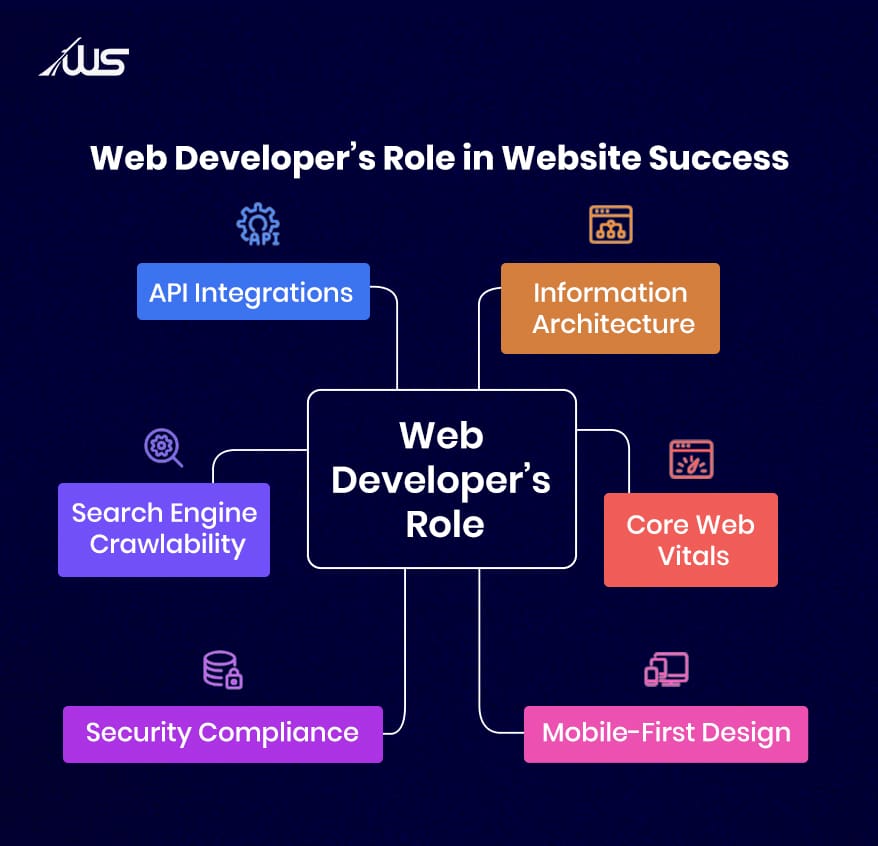
1. Designing the site’s information architecture from scratch
A web designer will work with you at your initial meeting to establish what each page will do for you.
You may create a homepage that describes your services and points visitors toward a services page, which describes each service in detail.
These subpages may give visitors to your site the option of emailing, calling or submitting a form for more information or to make an appointment.
Unfortunately, some sites are just not intuitive.
There must have been times when you needed something, and so you checked out a website. But, after struggling for a minute or two, you felt the navigation was too confusing. You were not able to find what you wanted, so you left.
It’s understandable. In fact, according to Web FX, 75% of users judge a company’s credibility based on its website design. For this reason, it’s vital to make a good first impression.
2. Engineering for Core Web Vitals and Search Authority
Core Web Vitals (loading speed, interactivity, and visual stability) are a ranking factor for Google. Basically it checks whether your web page loads quickly and does not randomly shift when it opens. Based on that, the search engine is likely to rank your page higher on Google.
If your visitor from Google search arrives on your website, and the text jumps or the images take too long to load, then your visitor is gone because they don’t have the time or patience to wait for your website to fully load.
What’s worse, if you are running ads to direct people to your website, each extra second it takes to load costs you an opportunity for a return on your ad spend.
Ideally, a web page loads quickly enough so that visitors do not experience a delay while trying to read, scroll, or respond to your website.
3. Mobile-First Responsive Design
Since 2023, Google has been doing something called mobile-first indexing. Simply put, this means that Google only uses the mobile version of a site’s content for indexing and ranking web pages on SERPs (Search Engine Results Pages).
What does this mean?
All primary content, including text, images, videos, and headings, must be identical on both mobile and desktop versions. If there’s any missing metadata or internal links on the mobile version of your site, it can negatively impact your overall SEO.
Plus, your website needs to be responsive, which means it must adapt seamlessly to any device type.
Imagine there’s a potential client that actually requires your services, but they are forced to zoom in on the screen, adjust the phone to check the content, or struggle to type in their information. You guessed it, they will abandon the process in frustration.
4. Advanced Security and Data Privacy Compliance
No one would enter their name and/or credit card information on a website unless they felt sure the website was secure.
A web developer makes sure to create secure pathways and set up some basic safeguards to keep the information that is collected from being made available to anyone.
In practice, they implement certain technical layers like AES-256 encryption, zero-trust architecture, and automated vulnerability scanning to ensure that their website is trustworthy.
If your site displays a “Not Secure” message in the browser or is not configured properly when someone attempts to make a payment, most people will leave out of fear.
Guess what? You may never know how many clients you lost as a result of not having a secure site.
To recognize a secure website, users are frequently advised to look for specific markers like:
-
HTTPS protocol
-
trust seals (like Norton Secured or McAfee Secure)
-
SSL certificate
-
privacy policy
5. Search Engine Crawlability (Technical SEO)
When a web developer creates your website, they will set it up so that search engines can crawl through each page and figure out what is on those pages.
This includes how page links are connected, the order of headings on the webpage, and how the content is set up in the website’s “back-end”.
The problem is if this is not set up correctly, then searchers will not be able to find your pages. You can have very extensive information on your service page, but no one can find it.
To set up your website for search engine crawlability:
-
Create sitemap.xml, submit to GSC/Bing
-
Create robots.txt (allow JS/CSS!)
-
Flat architecture (<4 clicks from home)
-
Remove orphan pages, use descriptive anchor text
-
Use clean, lowercase, hyphen-separated URLs
-
Use canonical tags to manage similar pages
6. Third-Party API Integrations
Your website will typically rely on several external features in order to work properly, like payment gateways, booking portals, maps, or email tools.
It communicates with these external services (integration) to perform specific tasks.
When someone completes an action (like booking an appointment or submitting a contact form), your website sends the data to that external service, receives a response, and shows the result immediately.
So, in case a visitor makes a payment through your website, the website transmits their payment information to the payment provider. Once the payment provider confirms or denies the transaction, the transaction notification can be seen by the customer on your website.
By having your tools automatically integrate with your website, you will be able to respond to requests much more quickly and will have eliminated that repetitive task from your workload.
Wrapping Up
According to Statista, mobile devices (excluding tablets) accounted for 62.54 percent of global website traffic. That means more than half the people visiting your website are seeing it on a small screen, often while moving or distracted. So, your mobile game will need to be tight.
Web development transforms everything behind the scenes, ensuring that your online presence is the strongest it can be. Ultimately, your sales, revenue, and growth depend on it.
Are you considering hiring a professional to develop your website? Webskitters is here for you. Our team builds robust websites with a clear focus on structure, usability, and performance. Rest assured that you will get ongoing support after launch.
Reach out to our expert web developers and tell us about your project.
Frequently Asked Questions
1. How much does it cost to build a website in India?
A basic site costs ₹5,000–₹20,000, small business sites ₹20,000–₹75,000, ecommerce ₹50,000–₹2,50,000+, and custom platforms go beyond ₹1 lakh depending on features.
2. How long does it take to build a website?
A simple website usually takes 1–2 weeks. A business website takes 3–6 weeks. Ecommerce or custom builds can take 1–3 months, depending on features.
3. Can I build a website myself instead of hiring a developer?
You can use builders and spend ₹3,000–₹15,000 yearly, but you handle setup, speed issues, and structure yourself, which often affects visibility and performance later.
4. How do I know if my website is actually working?
Check if people are visiting, staying, and taking action. If you get traffic but no calls, form submissions, or sales, something is not working properly.
5. What should I check before hiring a web developer?
See if they ask about your business goals, explain things clearly, and show past work. If they only discuss price, you may not get useful results.

 UI/UX Design
  Web Development
  Mobile App Development
  Internet Of Things
  Game Development
  Artificial Intelligence
  Digital Marketing
  Data Science Consulting