March 31, 2026
 There’s no way to fool search engines into ranking your pages higher on SERPs. On-page SEO is the next best thing.
With on-page SEO, you can get your website pages in front of a higher number of relevant searchers by following a few proven on-page SEO tactics.
In short, on-page SEO is the part of SEO that you can directly control, where you adjust the content, structure, and signals that search engines rely on to decide which pages appear first.
Just to make sure we are on the same ‘page’, we will start by looking at what on-page SEO is all about and find out some easy tactics you can use to boost and improve your rankings on SERPs (Search Engine Results Pages).
What is on-page SEO?
On-page SEO means improving the content and structure of a webpage so search engines understand it and show it in search results, and AI systems (like ChatGPT and Gemini) can display their content as responses.
On-page SEO includes things like:
- the text on the page
- the headings
- the page title
- the page description
- the page URL
- how the content is organized
The ultimate goal is to make the page clear for both Google and the person reading it.
If you need a comprehensive SEO guide, you can check out: Search Engine Optimization (SEO): The Complete Guide to Ranking, Traffic & Growth in 2026
Why on-page SEO matters
It is only when a page is well optimized that search engines can understand the topic of the page, and visitors can quickly see if the page answers their question.
This can lead to:
- higher rankings in search results
- more visitors coming to the site
- people staying longer on the page
When Google or other search engines assess a page, they try to answer three questions.
1. What is this page about?
2. Is it relevant to the search query?
3. Is the content helpful enough to show in results?
Several on-page SEO tactics help you answer these questions clearly.
This article will act as your guide to the easiest and proven on-page SEO techniques you can use to boost search visibility on both search engines and AI systems.
15 Practical On-Page SEO Tactics for Better Rankings
1. Meta Title Tags: The Line People Click in Google
If you check the search results, you can see that your page appears with a blue link. That’s the title tag.
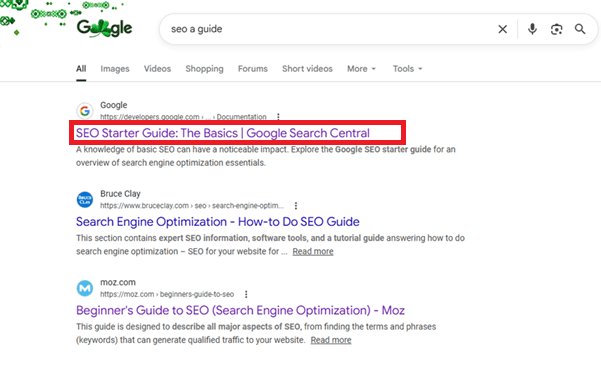
It may seem like an unimportant detail, but it does make a significant difference to your SEO game. Search engines are able to understand the topic based on the title, and when searchers come across it, it helps them decide whether the page looks useful.
You can verify this yourself. Go to Google, write a query, and then scan the results page.
You’ll notice that some titles immediately explain the page, but there are others that are vague or overloaded with words. If you expect your title to display fully on SERPs, it needs to be within 50 and 60 characters.
For a long time, Google Search Central SEO Starter Guide has advised website owners to keep their web page titles short and descriptive.
Practical things to keep in mind while writing title tags:
- keep them short enough that Google does not cut them off
- make the topic obvious within the first few words
- avoid repeating the same title across multiple pages
- ensure that the title explains the page without trying to sound creative
- position the branding toward the end if it is used
2. Meta Descriptions: The Short Explanation Under the Title
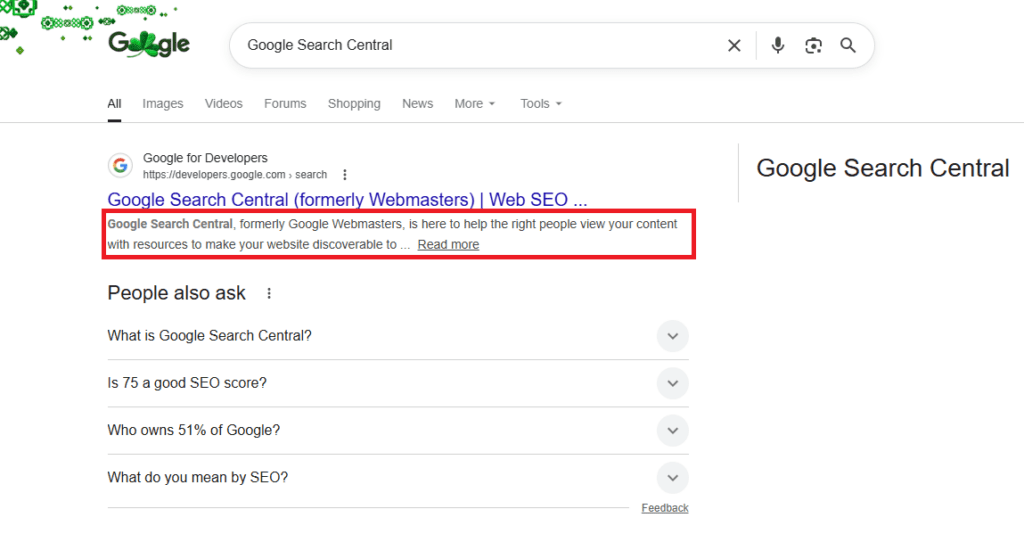
Just below the title in search results, you will find the description snippet. This snippet could be the meta description tag that you have crafted, or sometimes Google pulls a relevant sentence from the page itself to create the snippet.
Either way, it acts like a short explanation of what someone will find after clicking.
Maybe you noticed the difference when browsing search results.
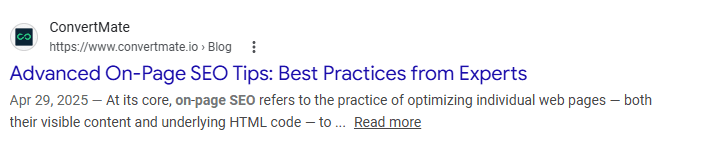
Above, you can see an example of a poorly written meta description with an unfinished thought.

Whereas, here, Semrush gives a meta description that clearly explains the content of the page.
Google’s own guidance in Search Central documentation mentions that you should write descriptions that summarize the page naturally without needing to stuff them with keywords. The goal is simply to help the reader understand what the page covers before they go ahead and click.
As you see above in the example of the meta description that’s poorly written, Google will automatically trim the description if it is too long.
3. H1 and H2 Headings: The Structure That Holds the Page Together
Headers or headings make the content on your web page scannable and easy to follow. The main heading, usually called the H1, introduces the subject of the page.
Subheadings like H2, H3, and so on divide the content of your page into sections that show the reader a clear hierarchy.
If you scroll through a well-organized article on Moz, you will probably notice the structure right away.
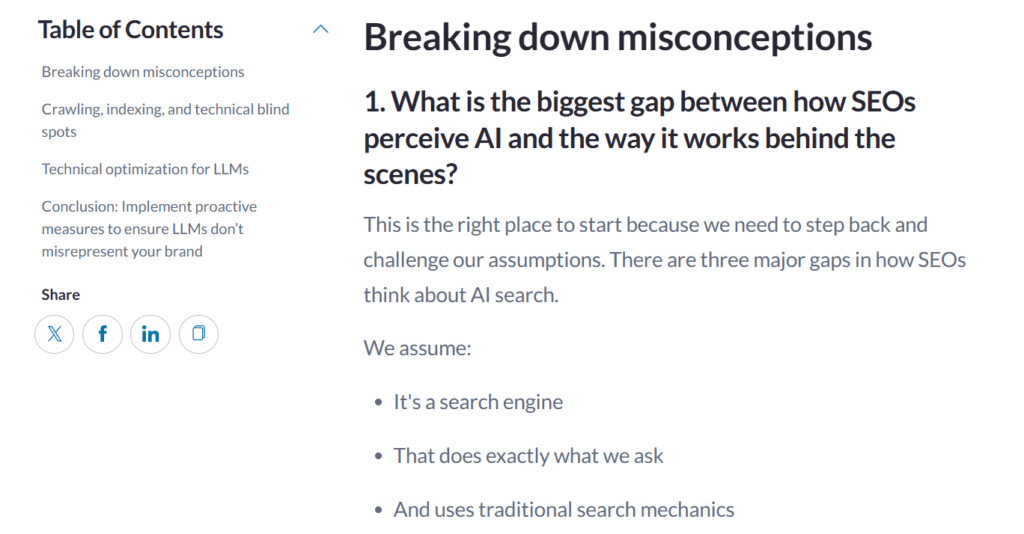
The headings present throughout the page guide you through the information step by step.
Even search engines rely on that structure to scan your web page. Headings help search engines to understand how the page is organized and which sections belong to the main topic.
When you write web page headings, use these patterns:
- one clear H1 heading describing the page topic
- H2 headings that divide the subject into logical sections
- headings that reflect the content that follows
- wording that stays simple and readable
- avoiding headings that exist only for keywords
The main reason you need a clear page structure is so that people can scan it without effort, and web crawlers can interpret it quickly.
4. Search Intent: Why Some Pages Rank and Others Do Not
You may be using all the right keywords, but you may still find that your pages are not ranking well on search results. The reason is often tied to something called search intent.
Search intent simply refers to the reason (intent) someone typed a query into Google.
The search intent can vary:
- The searcher may want an explanation (informational intent)
- The searcher may be comparing products (commercial intent)
- The searcher may be trying to reach a specific (brand) site (navigational intent)
- The searcher may be ready to buy or act (transactional intent)
The target keywords you choose should be based on search intent. Your content can include beginner tutorials and step-by-step explanations to satisfy informational intent. You can also use transactional intent keywords for your product pages and checkout-focused landing pages.
How to leverage search intent for SEO?
- Use the right tools to analyze SERPs and Keyword Modifiers
- Map your content into intent types (informational, navigational, commercial, transactional)
- Structure your content for quick scannability
- Ensure title tags and meta descriptions clearly reflect the search intent
If you want to learn how to align your content with searcher intent to improve rankings, read: 97% of Marketers Miss This $2B Search Secret: Why Search Intent matters!
5. Content Quality: The Factor That Still Decides Everything
It’s true that the SEO landscape is ever-changing, but the basic principle has not changed much. Website pages that genuinely help the reader are most likely to last longer in search results.
Google talks about this often in its Search Quality Rater Guidelines (SQRG) and its guidance around helpful content.
The underlying idea is simple.
The content on your website should show a comprehensive understanding of whichever topic you are covering. Google will not rank fluff content, so you must provide something useful to the person reading it.
What are some indications of high-quality content on a web page?
They often include:
- explanations that actually answer the question
- supporting details or examples that clarify the topic
- references to reliable information sources
- clear writing that avoids filler
- coverage of the subject beyond just the basics
Note: Pages built only around keywords tend to fade out of rankings sooner or later. Pages built around real information usually rank well on SERPs for longer periods of time.
6. Keyword Use: Let the Page Make Its Topic Obvious
We are sure you know this, but you do not really need to force keywords into every paragraph anymore. In fact, ‘keyword stuffing’ is likely to get your website penalized.
Google has moved far past that stage. What it mostly tries to understand now is the topic of the page.
A simple way to optimize your keywords is by using one primary keyword, and then using natural variations of that keyword across the page where they make sense.
For example, if your primary keyword is ‘email marketing software’, then this is what you can do:
- use the main keyword in the title and H1 → email marketing software
- include a close variation in a subheading → best email marketing platforms
- mention a natural variant early in the content → email marketing tools
- switch wording as you explain different parts → email automation tools
- reflect how people search in different ways → bulk email sending software
7. Page Speed Still Decides Whether People Stay
Back in 2018, Google updated its algorithm with the “Speed Update”. Why should you care?
Ever since then, ‘loading speed’ has been a ranking factor for mobile searches. It impacts pages that load slowly, because Google is extremely concerned about offering an excellent user experience.
According to Hostinger, if your page takes more than three seconds to load, the bounce rates can increase by 32%. So, pay attention to Largest Contentful Paint (LCP), a Core Web Vitals metric that calculates how quickly a page’s main content loads.
A few things to avoid that can cause slow page load:
- oversized images that were never compressed
- scripts from plugins or tracking tools
- heavy page builders
- cheap or overloaded hosting
- too many ads are competing to load
Google says: The intent of the search query is still a very strong signal, so a slow page may still rank highly if it has great, relevant content.
You can use tools like Google PageSpeed Insights or Lighthouse to check where the delays are happening on your web page.
8. Mobile Layout: Where Most Visitors Are Coming From Now
Check your website analytics on tools like Google Analytics and Hotjar. Website owners realize that well over half of their website visitors arrive from mobile devices.
This shift in user behaviour is the reason why Google switched to mobile-first indexing. That simply means the mobile version of a page is what the search engine mainly evaluates.
Suppose the layout of the website is too small on a big device or gets cut off on a small one. These are unresponsive websites.
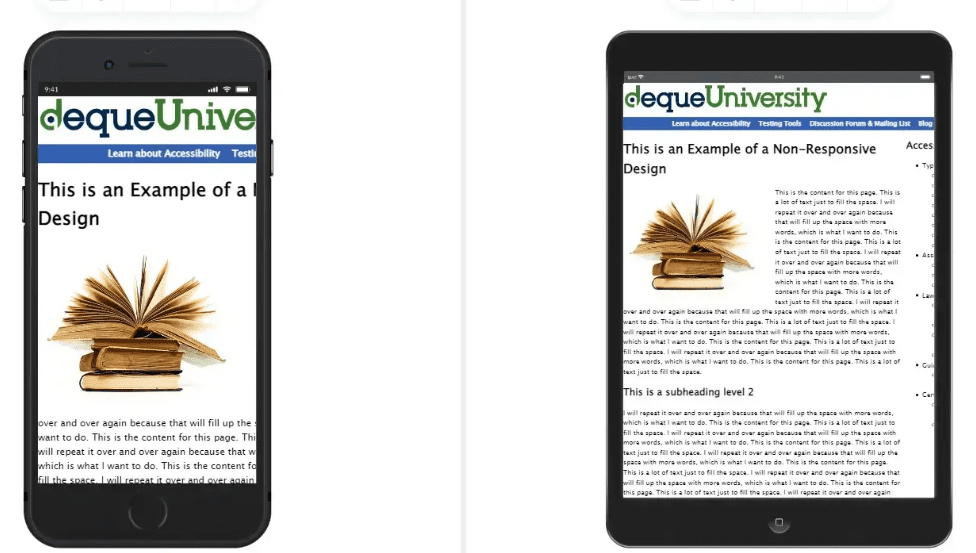
This is not something you can take lightly, as it can seriously impact your search visibility too.
While browsing Google, you may have seen how some pages resize properly, offering clear, readable text, buttons, and other elements. On the other hand, some frustrating sites appear overcrowded or awkward, almost like they were designed only for a desktop monitor.
Note: Google mobile-first indexing takes usability issues into account.
That means, if your website is difficult to navigate or has a poor experience on mobile devices, it is bound to rank lower in search results.
How to fix website usability issues on mobile devices:
- Use responsive design for all screen sizes
- Ensure readable text without zoom (minimum 16px)
- Keep tap targets (interactive elements) at least 48px wide
- Avoid intrusive pop-ups blocking the main content
9. Image Alt Text: A Small Detail That Still Matters
Of course, search engines cannot “see” an image the way a person can. They depend on the surrounding text and the alt attribute to understand what the image represents.
Alt text originally existed for accessibility. Screen readers use it to describe images to people who cannot see them. Google has confirmed many times that accessibility improvements like this also help search engines understand content better.
A few ways to write good Alt text:
- describe the image in plain language
- keep the wording short
- avoid listing multiple keywords
- match the description to what the image actually shows
- skip filler phrases like “image of”
Say you are displaying a photo showing someone analysing traffic data. The alt text can simply read: marketing analytics dashboard on laptop screen.
10. Internal Links: How Pages Quietly Support Each Other
When you publish a new article on your website, it should not be a standalone article. Other pages on your website should link back (hyperlinks) to that article. That is what internal linking is about.
What’s the point?
Say you have an older blog post that already gets steady traffic. Now, if that article mentions a topic you have covered elsewhere, linking to the newer page gives readers a path to follow.
Search engines notice those connections as well.
According to Google, internal links help web crawlers to discover pages. Not just that, they also help the system understand how information across a website ties together.
So, if your page includes links from several related articles, then search engines will be able to interpret it far more easily.
Some types of internal links that you can use on your page are:
- Navigation menu links — like your Home or Services pages
- Contextual in-content links — linking a related blog in your text
- Footer links — where you place things like policies
- Breadcrumb links — showing path like Home to Blog
- Sidebar links — showing readers your popular posts
11. URLs That Tell You What the Page Is About
What is the connection between optimizing URLs and search engine visibility?
When your web page URLs are optimized, it directly boosts their search engine visibility. You would essentially be providing search engines and users with clear, keyword-rich indicators of page content. Thus, your website rankings and click-through rate (CTR) are bound to improve.
Look at the difference between these two:
1. example.com/post?id=8721
2. example.com/wordpress-security-guide
While the first one explains the topic instantly, the other does not reveal much at all.
Many authoritative websites follow a few simple patterns:
- the URL reflects the subject of the page
- words are separated with hyphens
- unnecessary numbers or parameters are avoided
- the structure stays consistent across the site
Clean addresses also tend to look better when someone shares a link on social media or in an email.
12. E-E-A-T: Why Credibility Shows Up in Rankings
If you check Google’s Search Quality Rater Guidelines (SQRG), you will see the term E-E-A-T, which stands for Experience, Expertise, Authoritativeness, and Trust.
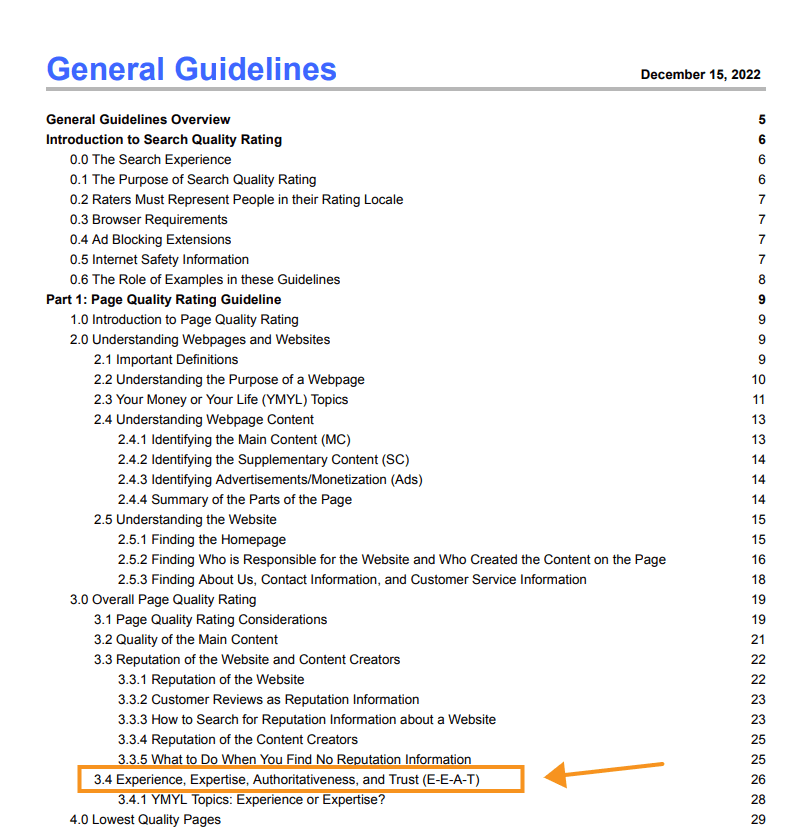
SQRG are the guidelines used by human reviewers who help evaluate Google search results.
The principle is fairly straightforward. Particularly if your web page covers serious topics like finance, health, or legal advice (referred to as YMYL or Your Money Your Life pages), search systems will favour you (rank you higher) only if your content displays clear expertise.
To rank your pages higher with strong E-E-A-T signals, you can include:
- author names with some background information
- references to research or recognized publications
- transparent contact or company details
- consistent writing on the same subject area
It is signals like these that help search engines judge whether the information is trustworthy.
To learn more about E-E-A-T and topical authority, check out: How to Build Topical Authority with EEAT to Boost Rankings
13. External Links: Showing Where the Information Came From
Internal links are great, but you are not always going to have the most comprehensive dataset or explanation available.
For this, you need external links, which, as the name suggests, are hyperlinks to web pages, which are meant to boost your page’s credibility and expertise.
It goes without saying that these should be authorities in your industry and not low DA (domain authority) websites.
Linking to authoritative sources helps readers understand where the information came from. It also gives context to search engines.
You must have seen these links in detailed articles like the one pictured below.
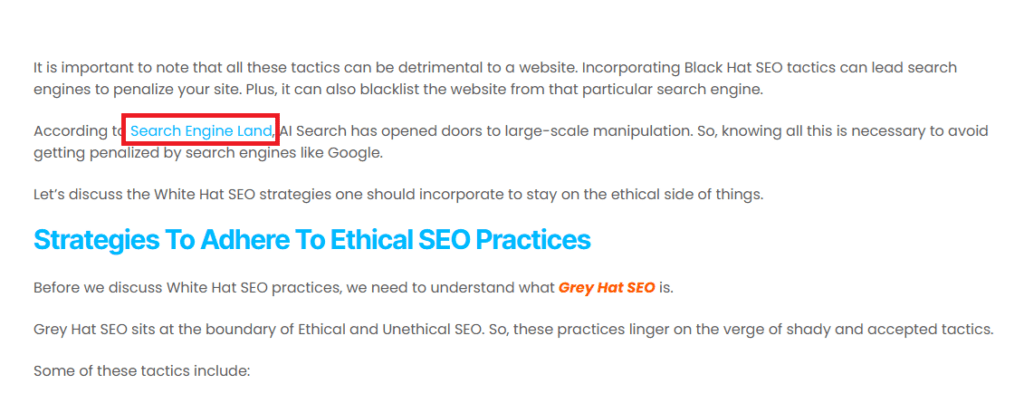
The article you see is discussing ethical SEO practices and links to research published by Search Engine Land. Similarly, a cybersecurity article might reference reports from sites like Dark Reading and other top sources.
You know how students use citations in academic writing, these external links act a bit like that. They show that the claims in the article are grounded in verifiable data and research.
14. Structured Data: Helping Search Engines Read Specific Details
Have you seen the extra information beneath some search results listings? They tend to include things like product prices, review stars, event dates, and even recipe instructions (these are known as rich results).
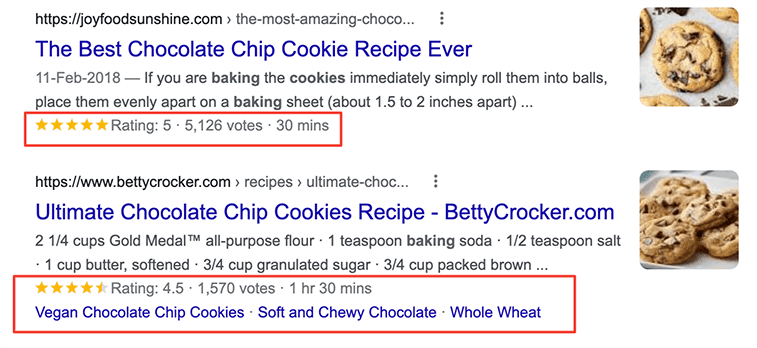
Those enhanced listings usually appear when a page includes structured data, also known as schema markup.
The markup sits inside the page code and labels certain pieces of information so search engines can interpret them correctly.
According to Search Engine Journal, users click on rich results 58% of the time, compared to a CTR of 41% for non-rich results.
It is a technical step, but for certain types of pages, such as product, education, Q&A, book, or event web pages, schema markup can make search listings far more visible.
Simple steps to do schema markup
- pick the schema type that fits your page content
- decide which details on the page need marking up
- gather key info like product, reviews, or business data
- use a schema generator to create the markup code
- add the generated code to your page HTML
- stick with JSON-LD since Google recommends it
- run it through Google Rich Results Test to check
15. Updating Older Content Before It Becomes Outdated
In case you wrote an article a few years ago, it might still be useful, but parts of it could be outdated.
The statistics may have changed, software interfaces could be upgraded, and some of your links may have stopped working.
Because of that, many content teams run periodic content audits. They go back through older material and decide what still deserves to stay visible on the website.
You might update a guide with newer data, replace broken links, or even add a section that covers something current readers ask about more often.
Google considers pages with accurate and updated content as trustworthy pages.
To “Freshen Up” Content, you can:
- Add New Information
- Update Multimedia
- Improve User Experience (UX)
- Refresh Dates
What Google Advises Against
Do not artificially “freshen” content.
- Date Stuffing: Changing the date without updating the content is a deceptive tactic that Google can detect.
- Massive Deletions: Deleting large amounts of content without redirecting can cause a loss of ranking.
Rank Higher on SERPs and Get Increased Traffic With On-Page SEO
It may seem like too much of a challenge to get your pages to rank higher.
Actually, it only involves small, consistent improvements across your website’s pages. When your content is clear, your structure makes sense, and your pages actually help the reader, search engines tend to respond to these signals.
Is your website attracting the kind of visitors you want?
If not, the team at Webskitters can help. Our experts can improve your page structure, align content with what people are searching for, and fix technical issues that affect visibility.
Get in touch with our SEO consultants to get started.
Frequently Asked Questions
1. What is on-page SEO?
On-page SEO is the process of optimising elements within a web page, such as content, headings, and structure, to help search engines understand and rank the page.
2. Why is on-page SEO important?
On-page SEO is important because it helps search engines interpret the content of a page and match it with relevant search queries from users.
3. How do I improve on-page SEO?
To improve on-page SEO, you need to optimize titles, headings, and content while ensuring the page matches search intent and is easy to read.
4. What are the most important on-page SEO factors?
The most important on-page SEO factors include content quality, title tags, headings, internal linking, page speed, and alignment with search intent.
5. How long does on-page SEO take to work?
When you do on-page SEO, it usually takes a few weeks to a few months for search engines to recognise changes and reflect them in rankings.

 UI/UX Design
  Web Development
  Mobile App Development
  Internet Of Things
  Game Development
  Artificial Intelligence
  Digital Marketing
  Data Science Consulting