April 23, 2026
 Is technical SEO just a dev thing? People often confuse technical SEO with a development approach. While it’s true that a lot of technicalities are involved with technical SEO, even small optimizations are a part of it. That’s why a technical SEO audit checklist should be the need of the hour.
What are the parts of a technical SEO audit checklist?
-
Indexing and Crawling by Search Engines
-
Optimization of User Experience
-
Website Navigation Assessment
-
Other Technical Aspects
-
Content-Specific Issues
Do you want to learn more about how to make a technical SEO checklist in 2026? Before that, let’s have a little discussion on technical SEO.
Technical SEO: A Backbone to Your SEO Strategy
Before jumping into the technical SEO Audit checklist, we need to understand what technical SEO is and why it is the backbone of the SEO strategy. But first, let’s understand what technical SEO is.
What is Technical SEO?
Simply put, technical SEO is about making your webpage visible in search engines. That means these strategies ensure your webpages are understood by search engines, allowing them to be indexed and ranked.
But, is technical SEO only about webpage indexing and ranking? No, it’s not. It’s much more than that. Technical SEO is all about providing a superior user experience (UX) to the visitors. And SEO strategies, such as On-Page and Off-Page SEO, including technical SEO, contribute greatly to that goal.
Learn More: Search Engine Optimization (SEO): The Complete Guide to Ranking, Traffic & Growth in 2026
Why Technical SEO Matters?
This is everyone’s question when it comes to technical SEO. You can say that technical SEO is the foundation for your SEO strategies. This means that technical SEO plays a big part in your SEO success.
Let’s explore 3 reasons why technical SEO matters for businesses in 2026.
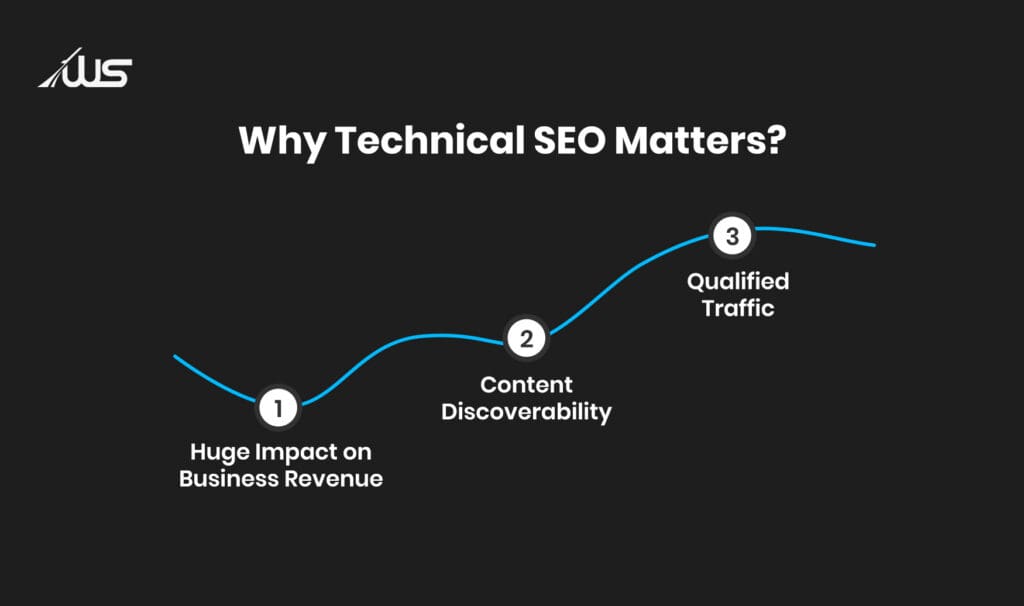
1. Huge Impact on Business Revenue
Technical SEO has a direct impact on the business revenue. When your webpage lags, the visitors will bounce quickly. This will lead to valuable prospects abandoning your business. And, even if someone stays, they can never trust your business. This can erode user confidence.
In UX, every second matters. So much so that a 1-second delay can reduce conversion rates by about 7%.
This pushes technical SEO into the limelight.
2. Content Discoverability
The most important role of technical SEO is to ensure your content is discoverable by search engines. For instance, if your key webpages are broken, blocked, incorrectly tagged, or duplicated, they will be absent from Google’s inventory.
And, as around 89.2% of search traffic comes from Google, the absence of these pages from this search engine can greatly harm your business.
3. Qualified Traffic
According to statistics, 53% of trackable traffic globally is organic search. Thus, you can attract a huge amount of organic traffic if you do technical SEO right.
This way, you can get more qualified traffic. Furthermore, if your webpages are fast and have a clean UI, visitors will be impressed by the exceptional UX the site provides.
Before moving on to the technical SEO audit checklist, we need to understand the pillars of a technical SEO strategy.
What are the 5 Pillars of Technical SEO?
Your products can be top-notch, and your branding can be sharpest. Still, if your site loads slowly and fails to provide a superior UX to the visitors, your digital marketing strategy is bound to fail. That’s why technical SEO is crucial.
Let’s explore the 5 pillars that lay a strong foundation for your technical SEO approach.
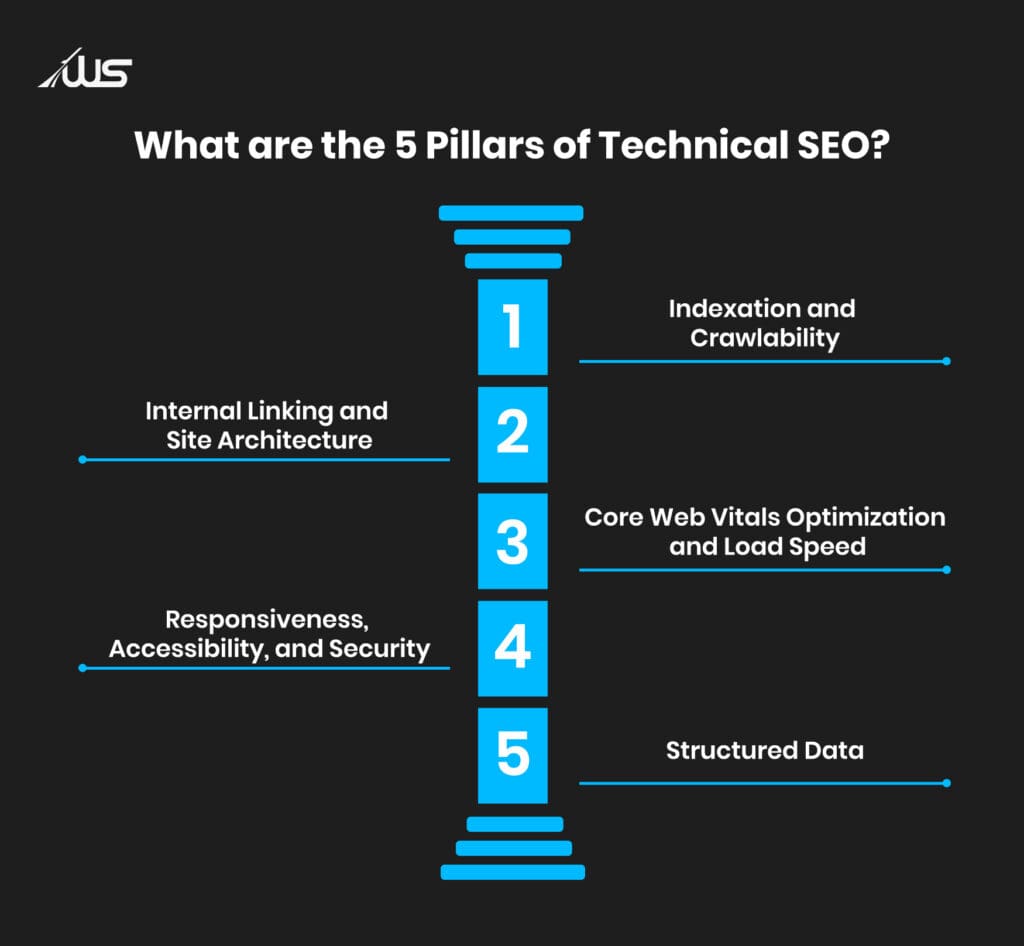
1. Indexation and Crawlability
You can imagine crawlability as the front door to your digital storefront (website) and indexation as an indicator of your presence on the internet.
Even if you write the cleanest copies, build strong links, and create great service pages, if Google crawlers can’t crawl it or choose not to index the page, you’re certainly hosting an invitation without an address.
2. Internal Linking and Site Architecture
If crawlability is the door to your digital showroom, then site architecture is the structure. A good structure can make your business feel organized and oriented. Conversely, a bad one can make it confusing.
Similarly, search engines can’t follow the site without a proper architecture. These crawlers look for relationships, relevance, hierarchy, and importance. Internal linking and site architecture aren’t nice-to-haves; they’re among the most important aspects.
3. Core Web Vitals Optimization and Load Speed
If the webpage lags, people lose interest in your business. When talking about websites, load speed leads to hesitation, which leads to abandonment. This abandonment leads to lost opportunities.
That’s why core web vitals optimization is very important. These strategies focus on your site’s load speed and behavior, including LCP, INP, CLS, and more. Surprisingly, even small, unglamorous, and boring fixes can improve the site’s speed.
Explore More: 10 Core Web Vitals Optimization Tactics to Skyrocket Your SEO
4. Responsiveness, Accessibility, and Security
Today, mobile devices are the primary lens through which people search. So much so that Statista reports mobile traffic (worldwide) in 2025 to be around 62.73%. And, that’s huge. Plus, Google prefers responsive sites because of the UX they provide.
Just like that, accessibility and security have their own share of significance. These things build trust and impress users.
5. Structured Data
If the above pillars make your site accessible, fast, and navigable, structured data enables search engine crawlers to understand what they are crawling. Schema markup is one such approach that helps Google understand the intent of the content.
This way, structured data can support results such as FAQs, enhanced snippets, and breadcrumbs, depending on eligibility and website type.
Now that we have a comprehensive understanding of technical SEO, let’s move on to the technical SEO audit checklist.
Technical SEO Audit Checklist that should be Every Business’s Priority
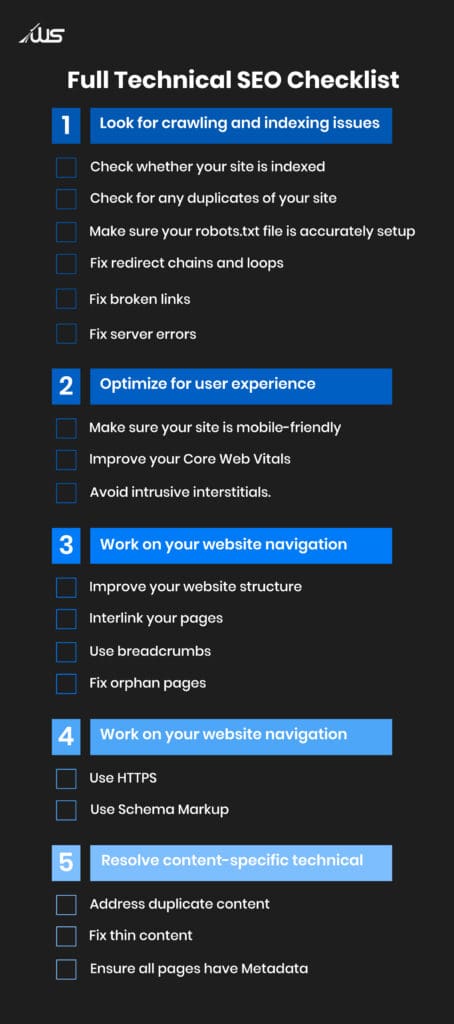
When you go for this technical SEO checklist, you shouldn’t ignore even the most common mistakes.
Let’s discuss the 5 items on this checklist.
1. Indexing and Crawling Issues
You have to ensure that search engines can save (index) and discover (crawl) your website. This makes sure your web pages rank in SERPs.
Check Indexing
This is the foremost thing you will have to do. That’s because if your site isn’t indexed, it won’t appear in search results. The best way to check this is by using GSC (Google Search Console).
In Google Search Console, go to the “Pages” report. This will give you the status of indexed pages.
There are a few reasons that GSC might give you:
-
Crawled (Not Indexed): This means Google crawled these pages and decided they aren’t worth indexing. Reasons for this may include low page quality or duplication.
-
Blocked (by robots.txt): GSC shows this reason when the robots.txt on your site signals that Google should not crawl these pages.
-
Excluded (by ‘noindex’ tag): It might also be possible that you have unintentionally added noindex tags to the webpages.
You have to fix these issues, then use the Validate Fix option to make Google crawl and index your pages.
Check for Duplication
Content duplication is a major issue that can hurt your SEO efforts. That’s because search engines see these pages separately, since they’re technically different.
And websites do run into these issues.
According to SEMrush’s report, around 27% of sites had both HTTPS and HTTP versions accessible simultaneously.
So, your site can be accessible at:
-
https://www.yourwebsite.com
-
https://yourwebsite.com
-
http://www.yourwebsite.com
You have to check if your website is accessible through different URLs by entering these variations in your preferred browser. If different versions load, then you must pick the one that you prefer.
Ensuring the robots.txt file is Properly Set up
robots.txt files are plain-text files that guide crawlers to the parts of your site that are accessible. If you set the file incorrectly, it can block access to the website’s most important files.
It looks something like this.
User-agent: *
Disallow: /wp-admin/
Allow: /wp-admin/admin-ajax.php
Fixing Redirect Chains and Loops
These can hurt SEO efforts by slowing down the site for users. This can negatively impact the crawl budget. Crawl budget is the resources (e.g., search engine crawlers) needed to crawl a website.
It makes it harder for these engines to pass ranking power to your webpages. Checking and fixing these redirect problems can keep your site smooth and seamless.
Fixing Broken Links
Broken internal links direct the visitors to pages that don’t exist anymore, leading to error pages (404). This can result in poor UX, signaling to search engines that the site isn’t well maintained.
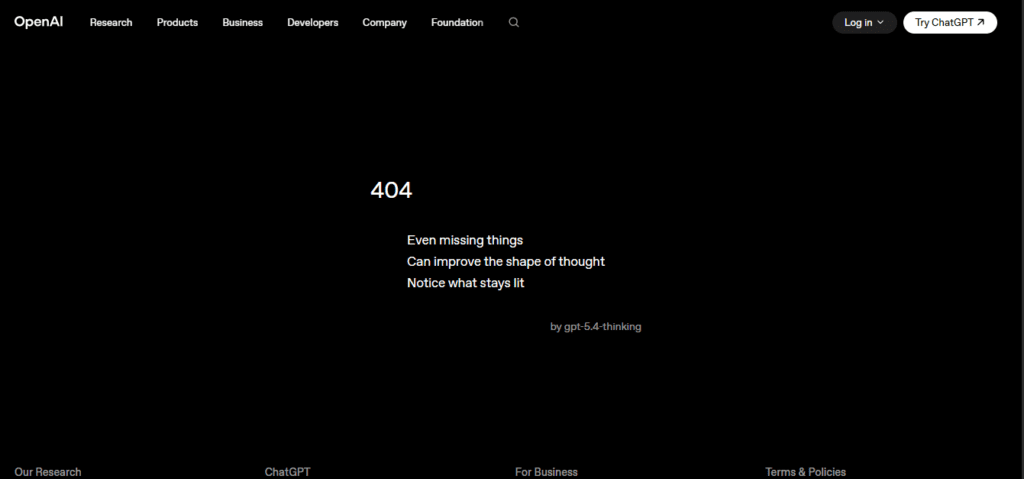
Broken links can be external links to other websites or internal links to your website content. You can use Site Audit tools to spot these issues.
You are bound to see errors if broken links exist.
Take the following actions:
For Internal Broken Links:
-
Restore the page
-
You can even set up a redirect (301) to send the users to the relevant page
For External Broken Links:
-
Replace the link with an updated page
-
You can remove the link entirely if possible
-
Find an alternative resource page that has similar information
It is important to schedule these checks weekly. You will be surprised how these pile up for large sites.
Fixing Server Errors
Server errors (also called 5xx errors) can be problematic as they prevent search engines from indexing or crawling your content.
Server errors indicate that something’s wrong with the server. One of the most common server errors is 500 Internal Server Error. This error is basically your server saying, “Something is wrong, but I don’t know what.”
There are other errors, too, like:
-
502 (Bad Gateway): It occurs when the server tries communicating with another server (to fulfill requests). But it receives invalid responses.
-
503 (Service Unavailable): This occurs when the server is under maintenance or overloaded with requests.
-
504 (Gateway Timeout): This occurs when the server doesn’t respond promptly.
You can check for server errors on your own in the Site Audit.
2. User Experience Optimization
Search engines reward websites that offer a superior user experience. Alongside that, good UX keeps the users engaged and empowers them to explore the content.
What are the main dimensions to cover in this? Let’s explore that.
Making sure your Site is Responsive
Search engines like Google use the mobile version to rank and index the website. It is very important to ensure your site is compatible with smartphones and other mobile devices.
To ensure this, Website Grader is a great tool. You have to enter your email address or domain. The tool will automatically assess whether the site is optimized for mobile devices.
Improving Core Web Vitals
As mentioned earlier, core web vitals optimization is one of the pillars of technical SEO. Google actively uses them as an important ranking factor.
The important metrics for this are:
-
LCP (Largest Contentful Paint): It measures how quickly the primary content of your webpages loads. Google’s standard for this is within 2.5 seconds.
-
INP (Interaction to Next Paint): It measures how quickly the webpage responds (visually) after user interactions. Simply, it is the time between your click and the webpage change. According to Google, this needs to happen within 200 milliseconds for an exceptional UX.
-
CLS (Cumulative Layout Shift): It is a measure of a website’s visual stability. And, Google’s threshold is under 0.1.
How to fix the issues related to Core Web Vitals? Go to GSC and click Open Report from the upper sidebar (under Core Web Vitals).
Then you have to look for pages that are marked “Needs Improvement” or “Poor”. These are the exact webpages that have failed Google’s CWV assessment. Thus, they need further optimization.
You have to copy the URLs of those pages and paste them into Google’s Page Speed Insights. From that, you can have recommendations to fix those issues.
Eliminating Intrusive Pop-ups and Overlays
These intrusive pop-ups and overlays are called intrusive interstitials.
But what exactly counts as intrusive interstitials?
-
Full-screen pop-ups that cover the entire content almost immediately after a visitor lands on the webpage,
-
Interstitials that must be dismissed before accessing the web content.
However, not every pop-up or overlay is problematic. There are exceptions:
-
Obligations like age verification or cookie notices
-
Login dialogues, where necessary
-
Banners that occupy a reasonable space and can be easily dismissed
-
Exit pop-ups when the user is about to leave the page
-
Small pop-ups appear after the user spends considerable time on the page
3. Website Navigation
You have to ensure the website has simple navigation that lets users find the most important content easily. This will also help crawlers understand your website.
Improving the Structure
A well-structured website is more important than a well-designed website. This is important for both the users and search engines. That’s because it determines how easily search engine crawlers can understand the page and how easily visitors can navigate your website.
The key is to create a hierarchy that makes sense. Let’s look at the diagram below to understand a logical hierarchy.
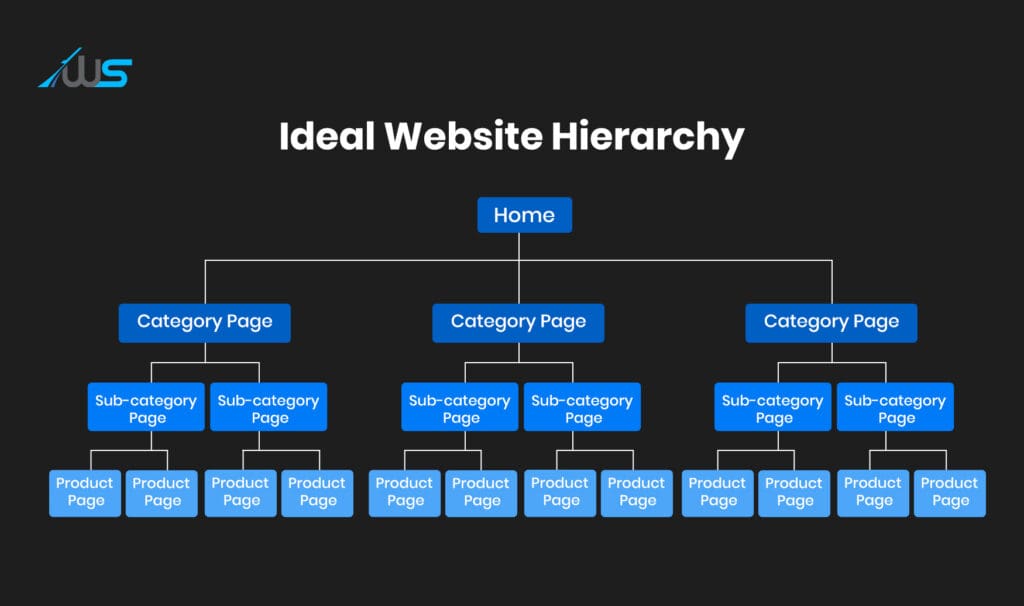
Each page should be accessible in just 3 to 4 clicks from the homepage. This can give your site solid navigation.
Interlinking the Pages
Interlinking the pages is one of the best SEO practices. So, a strong internal linking strategy is crucial for the site. This allows the crawlers to discover the content, helping visitors find relevant information.
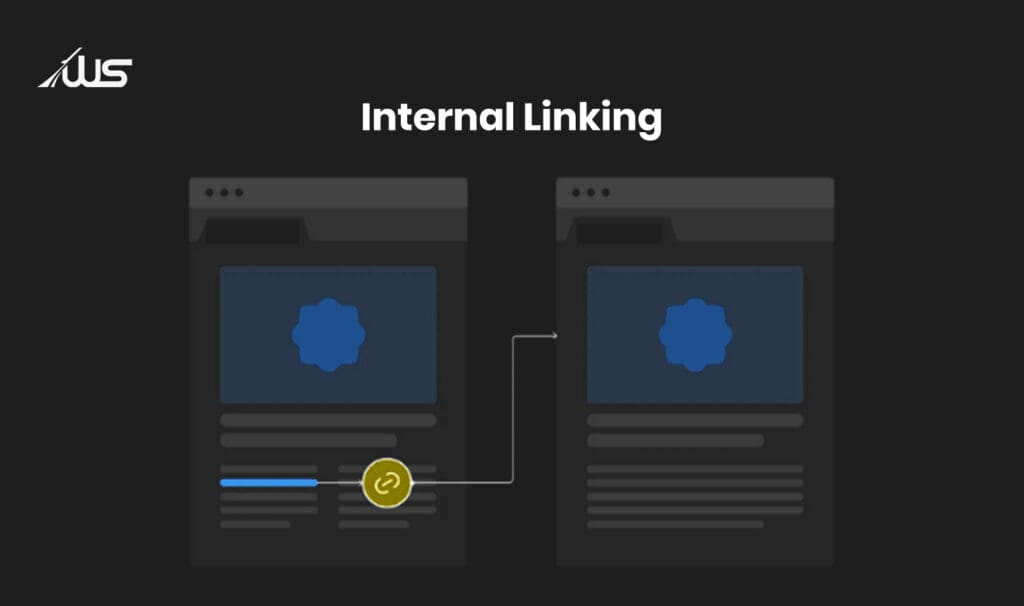
While using anchor text is an excellent internal linking strategy, there are other tactics as well. Let’s look at some of them.
-
Linking from the navigation menu to the important pages can give them extra authority.
-
Creation of Hub Pages that can gather all the relevant links and content pieces to it
-
Addition of “related posts” section at the end of a blog post
But don’t overdo it. Too many internal links can make the page look spammy.
Proper Usage of Breadcrumbs
Breadcrumbs are great for navigation, helping both search engine crawlers and users understand the website structure.
They usually appear at the top. They show the path a user took within the site. This way, they can easily navigate between the pages they visited.

You can check out this page. You can easily see the breadcrumbs at the top of the product page.
But every website doesn’t need breadcrumbs. It is mostly for websites with hierarchical content (eCommerce stores).
Fixing Orphan Pages
You have to fix orphan pages because they are difficult for crawlers and users to discover. That’s because they have no internal links.
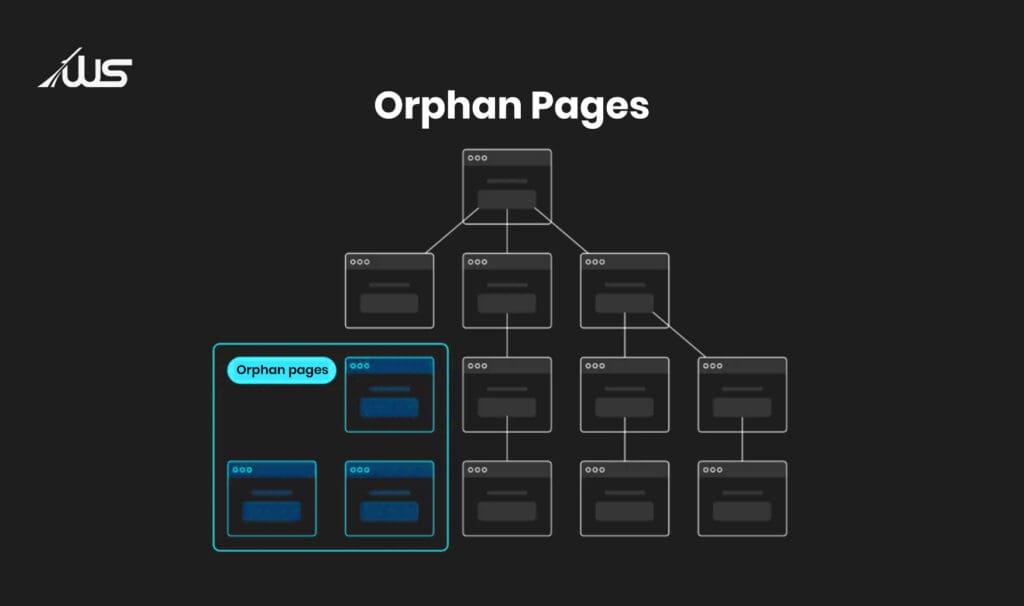
These orphan pages can accumulate over time as your website scales. According to SEMrush, 69% of 50,000 surveyed websites have at least one orphan page. This shows how common this phenomenon is.
4. Other Technical Requirements
There is a wide variety of best practices that Google recommends. Let’s discuss some of them.
Usage of HTTPS
HTTPS is the secure version of HTTP. HTTPS encrypts the interaction between the browser and the website. This protects sensitive data such as login credentials, payment details, and other personal information.
Google started using HTTPS as a ranking factor in 2014, providing an added SEO advantage to secure websites. Today, browsers flag non-HTTPS websites as “Not Secure”. This can erode user trust and increase bounce rates.
You can implement HTTPS by acquiring an SSL certificate. Most website hosting services provide this for free. This may seem like an advanced technical SEO thing, but implementing it can be highly beneficial for your website.
Addition of Schema Markup
Schema markup is a code that helps search engines clearly understand the web content.
Although it isn’t a ranking factor, this code allows rich results. This can improve the CTRs effectively. There are different schema markups:
-
For Homepage: Organization
-
For eCommerce Product Pages: Product
-
For Blog Posts or News: Article
-
For Event Page Content: Event
-
For Food Sites: Recipe
-
For Service or Product Reviews: Review
5. Content-Specific Issues
This section covers resolving common content-specific issues that can affect SEO performance.
Addressing Duplicate Content
Duplicate content hurts your website’s credibility, making it harder for search engines to rank and index the content for relevant queries. That’s why addressing these issues is of paramount importance.
You can use various tools to check whether your site has duplicate content.
Once identified, you can address this issue by:
-
Adding canonical tags
-
Consolidating these pages into a main, single page, and setting up 301 redirects (from old pages to the new one)
Fixing Thin Content
Thin content refers to the web pages that have little or no value to users, according to search engines. So, identifying and improving these content pieces can be crucial, as they can affect UX or rankings.
How to identify thin content?
-
Content that doesn’t add any value or is poorly written
-
Directly copied from other sites
-
Full of spammy links and ads
-
AI-generated without any value
Once you identify these pages, you must remove or rewrite their content. Remember, plagiarism is not just an SEO issue; it is more about ethics.
For thin, original content, you have to strengthen it with examples, insights, and practical tips that genuinely help the audience.
When it comes to spammy or overly promotional pages, focus on reducing them and optimizing the UX.
For AI-generated content, you can either get rid of the content entirely or rework it (making it useful).
Ensuring Every Page has Metadata
Metadata helps crawlers understand the content’s intent. When users search for something, the search engine matches this metadata with the query to assess relevance.
Moreover, metadata is what users will see before even clicking on the link to your site. This shows how important it is to ensure that web pages have optimized, complete metadata. This can substantially improve the CTRs and visibility.
Even the Small Things Matter in Technical SEO
Here you have it. Now that you know all about the technical SEO audit checklist and the SEO actions to prioritize, it’s high time that you execute them well.
It’s never about taking some advanced steps to make your SEO efforts stand out. Even small things matter when you aim to optimize your site. As we already discussed in our technical SEO audit checklist, identifying the most common mistakes might be your key to an outstanding website optimization.
Do you want to learn more about how you can carry out a technical SEO audit for your site? Webskitters can help.
Book a call with us and let our SEO experts help you strategize an SEO effort that’s best for you.
FAQs
1. What is indexing in SEO?
Indexing is when search engines store your web pages so they can appear in search results.
2. Why is crawling important for a website?
Crawling helps search engines discover and analyze your web pages.
3. How can I check if my site is indexed?
You can use Google Search Console to see which pages are indexed.
4. What causes duplicate content issues?
Duplicate content happens when the same content appears on multiple URLs.
5. What are broken links?
Broken links are URLs that lead to pages that no longer exist (404 errors).
6. Why are server errors harmful for SEO?
Server errors prevent search engines from accessing and indexing your site.
7. What is a mobile-responsive website?
It’s a website that works smoothly across smartphones, tablets, and desktops.
8. What are Core Web Vitals?
They measure your site’s speed, responsiveness, and visual stability.
9. What is schema markup?
Schema markup is code that helps search engines better understand your content.
10. What is thin content?
Thin content is low-quality content that provides little or no value to users.

 UI/UX Design
  Web Development
  Mobile App Development
  Internet Of Things
  Game Development
  Artificial Intelligence
  Digital Marketing
  Data Science Consulting